VRML and X3D: The Web's First 3D Formats, and What They Became
VRML was meant to be HTML for 3D and the plug-in era killed it. It survived anyway, as X3D and as the default export of a great deal of engineering software still running today.
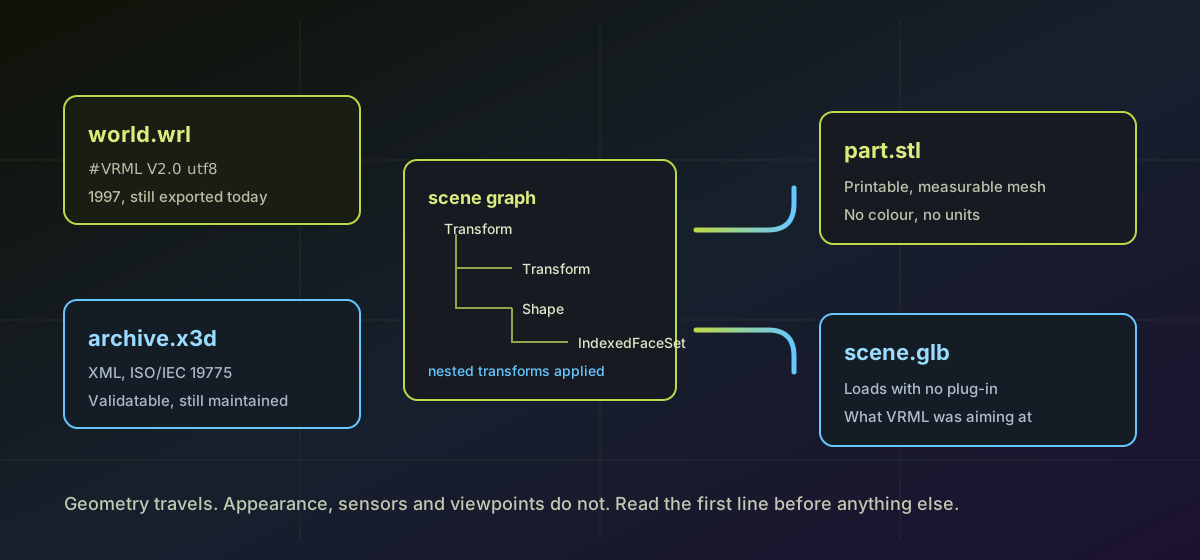
VRML was conceived at the first World Wide Web conference in 1994 as the 3D counterpart to HTML. Version 1.0 arrived in 1995, the far more capable VRML 2.0 followed in 1997 as ISO/IEC 14772, and the idea was that a .wrl world would sit at a URL and your browser would walk you through it. The plug-ins never became universal, the web went in another direction, and the format is remembered as a failed experiment.
It is not a failed experiment. A .wrl file lands in your inbox because a piece of engineering or scientific software exported one last week. That is the useful thing to know about it.
Why VRML files keep arriving#
CAD packages, finite element analysis tools and scientific visualisation software have defaulted to VRML export for decades, and a great many of them still do. The file coming out of a simulation package is a .wrl not because anyone chose a 1997 web format on purpose but because the exporter was written then and works. It carries per-vertex colour, which simple mesh formats such as STL cannot, so for a coloured stress plot it was genuinely the better option. The VRML format page covers what the node syntax holds.
Structurally a VRML file is a scene graph rather than a mesh. Transform nodes nest, and a shape inherits the accumulated transform of everything above it. Geometry is usually an IndexedFaceSet whose coordIndex list terminates each face with -1, which permits arbitrary polygons. DEF and USE let one node be reused by reference, so a reader that ignores USE silently drops geometry rather than failing. Sensors and interpolators can define interactive behaviour, which means some .wrl files contain what amounts to a small program.
X3D is what VRML became#
The Web3D Consortium reformulated VRML as XML in 2001 and ISO standardised it as ISO/IEC 19775. The concepts carried over intact: shapes, transforms, viewpoints, interpolators, now expressed as XML elements rather than curly braces. What XML added was validation. An X3D document can be schema-checked, transformed with XSLT and queried with XPath, which is a set of properties very few 3D formats offer and which archives care about a great deal. The X3D format page covers the geometry nodes.
X3D also added profiles. Interchange, Interactive, Immersive and Full declare a conformance subset, so a document states up front how much of the language a reader must implement, and partial support becomes explicit rather than a matter of finding out. The format is still actively maintained, and it is the archival 3D format of choice for several museums and standards bodies, even though glTF unambiguously won the delivery market.
Getting the geometry out#
For a mesh you can print or measure, VRML to STL parses the scene graph locally and applies the nested transforms, which is the part a naive triangle reader gets wrong. For something to put on a web page, VRML to GLB and X3D to GLB produce a single self-contained asset that a modern viewer opens without a plug-in, which is the outcome VRML was aiming at thirty years ago.
X3D documents containing a DOCTYPE or entity declaration are refused outright rather than parsed. External entity expansion is a well-known attack surface and model geometry has no legitimate use for it, so the safe behaviour is to decline the document rather than to sanitise it and hope.
What to check on the way out#
- Open the file in a text editor and read the first line. It costs nothing and tells you whether you have VRML 1.0, VRML97 or something mislabelled.
- Convert one file and look at it before converting a folder. Missing geometry is usually DEF and USE reuse, and it is obvious in a viewer and invisible in a file size.
- Compare the bounding box against what the source tool reported. VRML has no unit declaration, so scale is a convention rather than a fact.
- Decide whether colour mattered. If the export existed to show a coloured field, a plain mesh has thrown away the result and only the shape remains.
Other formats from the same era convert on the same terms, and the legacy 3D guide covers them. If the file came out of a CAD package as solid geometry rather than a mesh, the STEP and IGES guide is the relevant one instead.
VRML lost the argument about how the web would do 3D and then quietly outlived the argument. The files are still being written, they are plain text, and everything in them can be recovered without the software that produced them. For a format declared dead in about 2001, that is a better outcome than most.
Troubleshooting
Usually DEF and USE reuse. One node is defined once and referenced elsewhere, and a reader that ignores the reference drops the copies without reporting an error.
Check the first line. VRML 1.0 is a different language from VRML97 and shares neither syntax nor node set, so a VRML97 reader cannot read it however valid the file is.
Expected on a geometry-first route. VRML carries per-vertex colour and plain mesh targets generally do not. Keep the .wrl as the authoritative version if the colour was the result.
It contains a DOCTYPE or entity declaration. Those are declined rather than parsed, because external entity expansion is an attack surface and geometry never requires it.
VRML declares no units, so scale depends on the exporting application's convention. Compare the bounding box with what the source tool reported and scale once, deliberately.
Frequently asked questions
Is VRML actually obsolete?
As a web format, yes: browser plug-ins are gone and are not coming back. As an export format it is very much alive, because CAD, finite element and scientific visualisation packages still write .wrl files by default.
What is the difference between .wrl and .vrml?
Only the filename. Both hold VRML97 and both are identified by the header line rather than the extension. The three-letter form is far more common, and some importers reject the longer one purely on name.
Is X3D just VRML in XML?
Broadly, with real additions. Same scene-graph concepts, plus schema validation, conformance profiles, and later components for CAD geometry, volume rendering and physically based materials. It is still maintained, which VRML is not.
Will colour and interactivity survive a conversion?
No. These routes carry geometry with nested transforms applied. Appearance, per-vertex colour, sensors, viewpoints and animation are not represented in the mesh targets and are reported as losses.
Is my file uploaded?
No. Parsing and conversion run in your browser. A VRML export from an engineering tool is usually an unreleased design, which is exactly the kind of file that should not be sent to a remote service.