OBJ, Collada, FBX and X3D into GLB: What Survives the Trip
Four scene formats into one self-contained web asset. Geometry travels reliably, materials and rigging usually do not, and knowing which is which before you convert saves an afternoon.
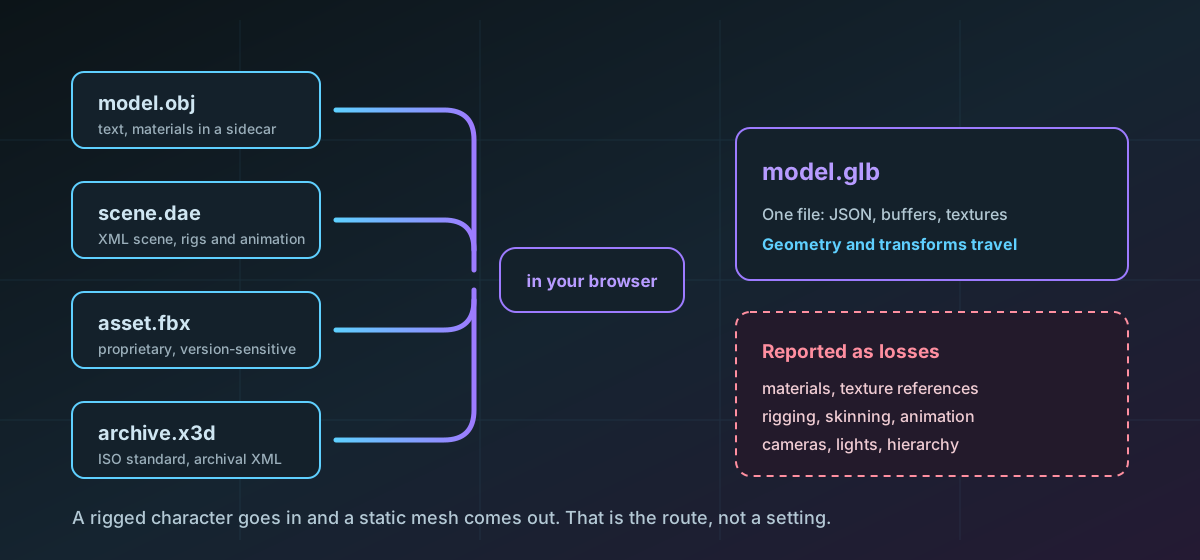
GLB is the format to convert towards when a model has to load in a browser, an AR viewer or a realtime engine. It is glTF 2.0 in a binary container: the JSON scene description, the mesh buffers and any textures in one file, fetched once. That single-file property is why it won the delivery role, and it is what makes the conversion worth doing.
What it does not do is make a scene format lossless. The honest framing is this: geometry travels, and most of what surrounds the geometry does not.
The four inputs are not equivalent#
OBJ is the simplest. Plain text, vertex positions, texture coordinates, normals and the faces indexing them, with materials pushed out into a companion .mtl file that references image files alongside it. That external dependency is OBJ's defining weakness in transit: a lone .obj arrives grey. OBJ to GLB produces the single file that removes the problem for delivery, and the OBJ format page covers what the syntax actually carries.
Collada is an XML scene document that can hold meshes, materials, cameras, lights, skeletons, skinning weights and keyframe animation in one inspectable file. Sony started it in 2004 to stop every PlayStation studio writing its own exporter, and Khronos has since redirected new work to glTF, so it is a mature format in maintenance rather than one still evolving. It remains the native interchange for SketchUp and Google Earth models, which is why Collada to GLB comes up so often.
FBX is the Autodesk interchange format, binary or ASCII, that most of the 3D content marketplace ships in. It can describe a complete authored scene rather than a mesh. It is also proprietary and version-sensitive, so two exporter generations can produce materially different dialects of the same format. FBX to GLB accepts bounded self-contained binary and ASCII polygon geometry.
X3D is VRML reformulated as XML and standardised as ISO/IEC 19775, still actively maintained, and the archival 3D format of choice for several museums and standards bodies. X3D to GLB reads inline coordinate points with indexed face or triangle sets. Documents containing a DOCTYPE or entity declaration are refused rather than parsed, because external entity expansion is an attack surface with no legitimate use in a model file.
What to do about the parts that do not travel#
- Decide whether you need the scene or the shape. A great many GLB conversions exist to put a static object on a web page, and for that a geometry-only result is the finished article.
- If you need materials, keep the source. The .dae or .fbx with its texture folder remains the authoritative version; the GLB is a derivative for delivery.
- If you need animation on the web, author it in a tool that exports glTF directly rather than converting an FBX and hoping. Blender's glTF exporter carries skins and animations; a geometry-first converter cannot invent them.
- Check the triangle count before committing. A film-quality mesh is not a web asset regardless of container, and GLB does not decimate anything.
Things that go wrong, and why#
A Collada file whose geometry renders as nothing is usually a scene where the mesh exists in library_geometries but nothing in library_visual_scenes instantiates it. A VRML or Collada scene missing parts is often DEF and USE reuse that a naive reader skipped. An FBX that imports at a hundredth of the expected size is the units layer, which is exactly the sort of thing that is a separate layer from geometry and therefore does not survive flattening intact unless transforms are applied properly.
Collada's asset block declares up-axis and unit scale explicitly, which is why it survives axis conversion better than formats that leave the convention implicit. The Collada format page has the detail, and the GLB format page covers the container you are converting into.
When GLB is the wrong target#
- For 3D printing. A slicer wants a manifold mesh with declared units, which means STL or 3MF rather than a realtime delivery container.
- For continued editing. Convert for delivery and keep editing the source; a GLB that has lost its materials is a poor place to start work.
- For archival. X3D and Collada are text formats readable without their authoring tool, which is the property an archive wants and a binary buffer format does not have.
- For CAD. A GLB of a machined part is triangles approximating surfaces that were defined analytically, and the precision is gone for good.
The printing and CAD routes are covered separately in the guide to STL, OBJ, GLB and STEP, and the older formats in the legacy 3D conversion guide.
Convert one representative file first and look at it in a viewer before you queue the rest. Geometry, scale and orientation are quick to confirm, and they are the three things worth confirming.
Troubleshooting
Expected. This is a geometry-first route: materials and texture references are reported as losses. Keep the source file and its texture folder as the authoritative version.
The mesh is probably in library_geometries with nothing in library_visual_scenes instantiating it. Geometry that no node places in the scene renders as nothing, in every tool.
Unit conventions differ between exporters and OBJ declares none at all. Scale in the destination tool, or re-export from the source with the units you want.
The document contains a DOCTYPE or entity declaration. Those are refused rather than parsed because external entity expansion is an attack surface, and model geometry never needs them.
They were never converted. Skins, skeletons and keyframes are not carried by a geometry-first route. Export glTF directly from the authoring tool if animation has to survive.
Frequently asked questions
Will my materials survive a conversion to GLB?
No. Transforms are applied so the geometry lands correctly, but materials, texture references, rigging, animation, cameras and lights are not carried across and are reported as losses. Keep the source file for anything that needs them.
Why convert to GLB rather than glTF?
GLB packs the JSON, the buffers and any textures into one file, so a viewer fetches it once and nothing is missing. A .gltf often references external .bin buffers or images, and a lone .gltf that lost them is incomplete.
Is GLB a good format for 3D printing?
No. A slicer wants a manifold mesh with declared units, which means STL or 3MF. GLB is a realtime delivery container and carries no units guarantee.
Why does the same FBX behave differently in different tools?
FBX is proprietary and version-sensitive, and exporter generations produce materially different dialects. A file that is valid to one importer can be awkward for another, which is a property of the format rather than of any one tool.
Is my model uploaded to convert it?
No. The conversion runs in your browser. Unreleased product models and client work under NDA are exactly the files that should not be handed to a remote service just to change their container.