Turn a Photo Into a Printable Relief Plate
Brightness becomes height, so a picture turns into a plate you can print and hold. What a relief is, why it is not a 3D model of the subject, and how to set the width, base and relief height in your browser.
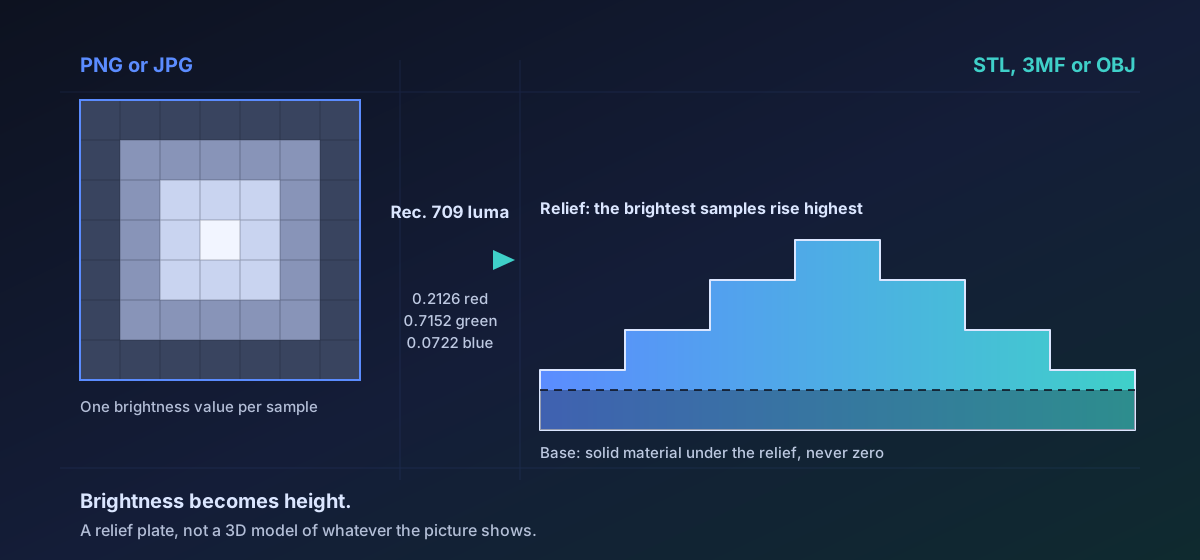
Feed a picture in and get back a flat plate whose thickness follows its brightness. Light parts stand proud, dark parts stay low, and the picture is readable in the surface once it is printed. That is a relief, and the new Relief Studio builds one in your browser and shows you the model before you download it.
How a pixel becomes a millimetre#
Every pixel becomes one brightness value using the Rec. 709 luma weights: green counts for 0.7152, red for 0.2126 and blue for 0.0722. A flat average of the three channels is not a reasonable substitute, because an eye takes most of its sense of lightness from green and almost none from blue. Average them and a saturated blue reads as mid-grey, putting a visible millimetre of plastic where the picture looks dark.
Transparency is folded in rather than ignored: the alpha channel composites each pixel over black, so anything transparent lands at the bottom of the range. That is what makes a cut-out PNG behave the way you would hope, with the subject raised and the empty background left flat.
Six controls, and what each one costs you#
- Plate width, 20 mm to 300 mm. The height follows from the picture's own proportions, so this one number sets the footprint.
- Base thickness, the solid material under the relief. The default is 1.5 mm, and anything under 0.6 mm gets a warning, because a plate that thin cracks when it is handled.
- Relief height, how far the brightest part rises above that base. The 3 mm default on a 100 mm plate is deliberately subtle; the control runs to 20 mm, and the difference is obvious once you push it.
- Invert, which makes dark high instead of light. This is what a lithophane needs, for the reason below.
- Smoothing, zero to four box-blur passes over the height field.
- Detail, the grid samples along the longest edge, from 60 to 400. At the default of 200 that is at most 40,000 cells and around 160,000 triangles; higher is finer and much larger.
Why a lithophane wants invert switched on#
A lithophane is a relief you hold up to a light rather than look at directly, and light behaves the opposite way round to a surface. Thick plastic passes less light, so the thick parts of the plate read as the dark parts of the picture. Leave invert off and a backlit plate comes out as a negative; switch it on and the dark parts become the thick parts that block the light.
Why the picture is averaged down rather than sampled down#
A twelve megapixel photograph carries far more detail than a nozzle can lay down, so the image is reduced to the grid you asked for by averaging the pixels in each cell, not by picking one and discarding the rest. Dropping pixels turns a smooth gradient into stair steps, and a step that is invisible on a screen becomes a ledge you can feel once it is a fifth of a millimetre of plastic. Smoothing then takes the edge off single-pixel spikes no nozzle could reproduce anyway.
The plate is a closed solid on purpose#
What comes out is a top surface, a flat floor and four walls joining their borders, all wound so their normals face outward. A slicer has to tell the inside of an object from the outside, and a draped sheet of triangles gives it no way to do that. It is also why a base thickness of zero is refused: at full black, a top border vertex would sit exactly where the floor vertex beneath it already is, the wall joining them would collapse to nothing, and the plate would ship with a hole in its side. Our guide to STL, OBJ and GLB covers what each format carries.
The preview is the file, not a rehearsal of it#
Once the mesh is encoded, the Studio parses those bytes back and previews what it parsed. That costs one extra parse and buys a guarantee the obvious implementation cannot make: what you are looking at is what downloads, having survived both the writer and the reader. The same re-opened mesh is inspected before the button unlocks, and the report says whether the surface closes and how many triangles it holds. Geometry that is broken as data stops the download; softer findings are reported and left to your judgement. Duplicate vertices, incidentally, are normal in STL, which stores three full coordinates per triangle and has no idea of a shared corner.
Six routes are live: PNG and JPG in, STL, 3MF or OBJ out. STL is what slicers expect, 3MF carries the same geometry in a container that records its own units, and OBJ is there if the plate is going into modelling software first. The Studio is where to run them, because these are parameters whose effect nobody can predict without seeing the result. One caveat, stated plainly: png-to-stl and its five siblings are unit-tested, including a proof that the mesh comes out closed, but they do not yet have the browser fixture this site requires before it advertises a conversion in search, so they stay reachable rather than promoted.
Vector art is not accepted, and that is a decision rather than a gap. An SVG has no brightness field until somebody picks a resolution to draw it at, so rasterising one here would be inventing the input rather than reading it. Rasterise it yourself at the size you want and bring the PNG. Our notes on point clouds and printing formats pair well with this one.
Troubleshooting
The picture has very little tonal range, so nearly every sample lands at the same height. Raise the relief height, or start from a picture with real separation between its light and dark areas. A relief can only use the brightness that is actually there.
Detail is high and smoothing is at zero, so single-pixel noise in the photograph is being reproduced faithfully. Add a smoothing pass or two, and consider lowering detail: a grid finer than the nozzle buys nothing but file size.
The base is too thin. Below 0.6 mm there is not enough solid material under the relief to survive handling, and the run warns about it at the time. Raise the base thickness rather than the relief height.
Detail is the knob that decides this. It sets the grid samples along the longest edge, and the cell count rises with the square of it, so 400 is roughly four times the mesh of 200. Drop it until the file is reasonable; the printed surface will usually look the same.
Either it is above 40 megapixels, which is refused rather than attempted because decoding costs the memory before anything can be reduced, or it is an SVG, which is not accepted. Resize or rasterise it first and bring a PNG or JPG.
Frequently asked questions
Does this make a 3D model of the person in my photo?
No, and it is worth being blunt about it. It makes a relief: a flat plate whose thickness follows the brightness of the picture. Nothing recovers the shape of a face, a body or a building. You get a plate with a face-shaped pattern in it, not a bust of the person. Recovering real shape from a photograph is depth estimation, a different problem with its own uncertainty, and it is not what this does.
Which pictures work best?
Ones with a clear subject and real separation between light and dark. Strong contrast gives the plate something to work with, while a flat, evenly lit picture produces a flat, uninteresting plate. A cut-out PNG with a transparent background is ideal, because transparency composites over black and becomes the low ground, so the subject rises from a flat field with no extra work.
Why will it not let me set the base thickness to zero?
Because the result would not be a closed solid. At a base of zero, any fully black sample puts a top border vertex in exactly the same place as the floor vertex under it. The wall triangle between them collapses to zero area, the side of the plate opens up, and the file slices into something with a hole in it. That failure is invisible until a slicer complains, so it is refused at the point the numbers are entered.
Should I turn on invert?
Turn it on for a lithophane, which is a plate meant to be lit from behind, because thick plastic passes less light and so the thick parts have to be the dark parts of the picture. Leave it off for a plate you are going to look at in ordinary light, where the bright parts should be the ones that stand up and catch it.
Is my photograph uploaded anywhere?
No. The image is decoded, converted to a height field, turned into a mesh and encoded entirely inside your browser. There is no upload and no server-side copy. The preview is not a special case either: it is the encoded file parsed back and drawn, so what you are looking at is what the download contains.
Which output format should I pick?
STL if you are going straight to a slicer, which is what most people want. 3MF if you would rather the file record its own units. OBJ if the plate is going into modelling software before it gets printed. The geometry is identical in all three; only the container differs.