EPS, AI, EMF and WMF: What Converts Here and What Does Not
Four legacy vector formats, four different reasons they are awkward, and a plain statement of which routes this site actually has. None of them comes back out as editable SVG.
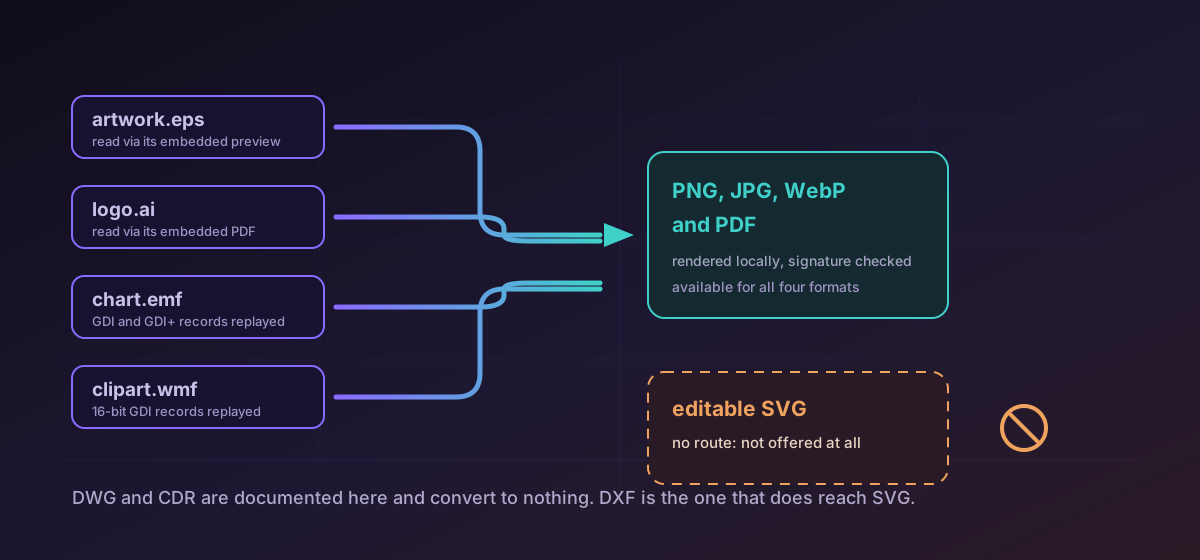
Old vector files arrive from archives, from print suppliers, and from Word documents nobody has opened in a decade. They look interchangeable in a folder listing and they are not: EPS, AI, EMF and WMF come from four different lineages, and the reason each is awkward is different in each case. This article says what this site does with them and, more usefully, what it will not do, because the second half is what you need before planning a piece of work.
The honest headline#
EPS is a program, and that is the whole problem#
Encapsulated PostScript is not a drawing description in the way a modern format is. It is a PostScript program with a bounding-box declaration wrapped around it, and rendering one faithfully means executing that program in a real interpreter. Interpreting untrusted PostScript is a genuine security risk, which is why Microsoft Office disabled EPS import outright in 2017 and why support has been shrinking ever since.
This converter does not interpret PostScript at all. It reads the low-resolution preview image that the EPS format is allowed to embed for exactly this purpose: the TIFF or WMF section of a binary EPS wrapper, or the ASCII-hex preview block of an EPSI file. That gives you EPS to PNG and EPS to PDF, with JPEG and WebP available as well. Be clear about what you are getting: the resolution of the preview, not the resolution of the artwork. An EPS saved without a preview is refused with an explanation rather than half-rendered, which is the correct behaviour but an unwelcome surprise if you were counting on the file.
AI is two files in one, and only one of them is readable#
Since Illustrator 9 in 2000, an Adobe Illustrator file saved with PDF compatibility has contained two things: a fully valid PDF rendition of the artwork, and a private stream holding the editable state that only Adobe's software fully understands. Every non-Adobe tool that opens .ai files, this one included, is reading the PDF half. That is why AI to PDF keeps real vector geometry and real text while dropping layers, symbols, live effects and appearance stacks: those live in the half nobody else can read.
Two kinds of .ai file fail here, and both fail loudly rather than silently. A file saved with PDF compatibility switched off contains no readable rendition at all. A pre-2000 .ai is PostScript rather than PDF underneath and needs entirely different parsing. Both are refused with an explanation instead of being mis-parsed into something plausible and wrong.
EMF and WMF are recordings of Windows drawing calls#
Windows Metafile arrived with Windows 3.0 in 1990 as a replayable log of 16-bit GDI drawing commands, and an enormous quantity of 1990s clip art shipped in it. Enhanced Metafile replaced it in 1993 with 32-bit coordinates and device independence, and it is still what moves through the clipboard when you paste a chart from Excel into Word. Neither has ever been rendered by a web browser.
Both are rendered here into validated raster images, so EMF to PNG and WMF to PNG work, as do the other raster targets and PDF. The weak points are inherited from the formats rather than invented by the converter: WMF caps coordinates at signed 16-bit values, has no transparency, and has no native curve record, so curves arrive already flattened into polylines. Text positioning and clipping are where metafile rendering outside Microsoft's own stack usually goes astray, so check the labels on a chart before trusting one.
The formats with no conversion route at all#
Two more legacy vector formats have reference pages on this site and no conversion whatsoever. DWG, AutoCAD's native drawing database, is documented because people need to identify it, and there is no route to anything. CorelDRAW's CDR is in the same position: proprietary, undocumented by its vendor, and read outside CorelDRAW only through reverse-engineered libraries. Neither is a coming-soon. Exporting to a published interchange format from the application that owns the file remains the reliable path for both.
DXF is the exception among old vector formats, and it is worth knowing about for that reason alone. It is a published, documented, mostly plain-text interchange format, which is why DXF to SVG exists when none of the four formats above have an equivalent. If a supplier can send you DXF rather than DWG, ask for it. Converting CAD drawings to SVG and PDF covers that route properly.
What to do with an archive of old artwork#
- Keep the originals. Whatever you produce here is a rendition, and a rendition is not an archival replacement for the file it came from.
- Decide whether you need pixels or editable curves. If it is curves, stop and use a desktop editor that imports the original format.
- For EPS, check whether a preview is embedded before planning around it. No preview means no conversion on this site.
- For AI, confirm the file was saved with PDF compatibility. A studio can usually re-save it correctly in a few seconds if it was not.
- Inspect the result at full size, particularly text placement in metafiles and the effective resolution of an EPS preview.
Troubleshooting
It was saved without an embedded preview. This site never interprets the PostScript program, so a file with no preview has nothing readable in it.
You are seeing the embedded preview, which is low resolution by design. The vector artwork itself is in the PostScript, which is not interpreted here.
It was saved without PDF compatibility, or it predates Illustrator 9 and is PostScript underneath. Re-saving it from Illustrator with PDF compatibility on resolves the first case.
Text records reference fonts by name and rendering outside Microsoft's own stack is where placement drifts. Check labels against the original before using the output.
No route here produces them. Use a desktop editor that imports the original format, and ask suppliers for DXF rather than DWG where that is an option.
Frequently asked questions
Can I convert EPS to SVG here?
No. That route does not exist, and neither do AI to SVG, EMF to SVG or WMF to SVG. The available destinations for all four formats are raster images and PDF.
Why is my EPS output low resolution?
Because it is the preview image the file embeds. This converter never interprets the PostScript program itself, which is precisely the risk that led Microsoft Office to drop EPS import, so what you get is the preview the file already contained.
What happens to Illustrator layers and effects?
They are dropped. They live in a private stream that only Adobe's software reads, so every non-Adobe tool works from the embedded PDF rendition instead. Geometry and text survive, editability does not.
Does this site convert DWG or CDR?
No. Both have reference pages so you can identify them, and neither has any conversion route. Export to a published interchange format from the application that owns the file.
Are these files uploaded for processing?
No. Every route described here runs in your browser. That matters for old brand archives in particular, which tend to hold logo masters for unlaunched products and clients who prefer not to be named.