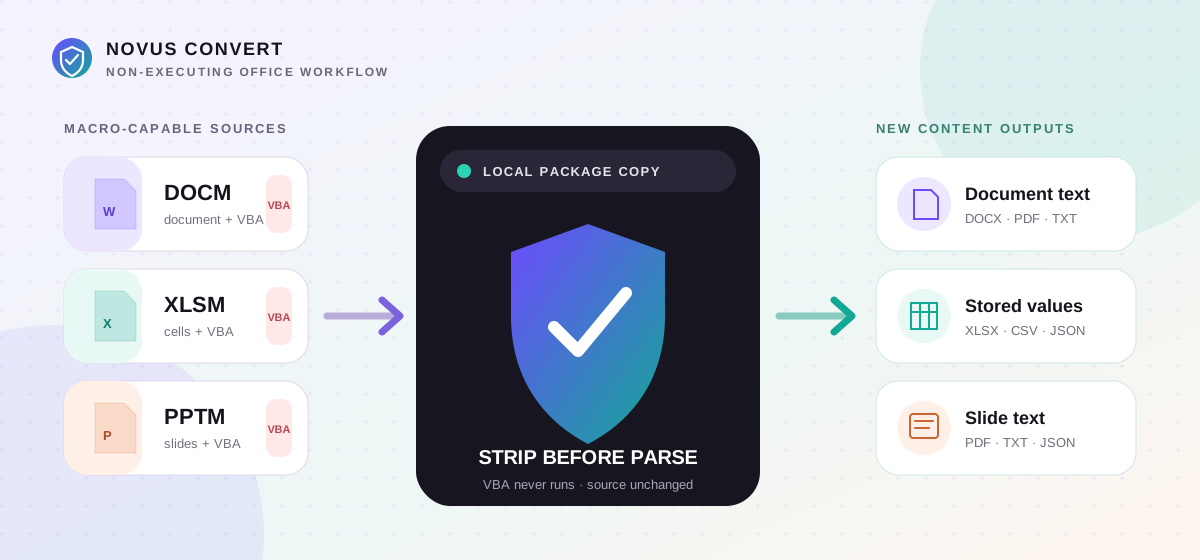
Convert DOCM, XLSM, and PPTM safely without running macros.
Extract useful document text, workbook values, and slide text from macro-enabled Office packages locally without interpreting or copying their VBA payloads.
A DOCM, XLSM, or PPTM file is not automatically malicious, but each extension announces that the Office package is allowed to contain executable macro code. That distinction matters when a file arrives through email, a ticket, a shared folder, or an old archive. If the immediate need is to read the prose, recover worksheet values, or inspect slide text, opening the source in a desktop Office application and clicking through a security prompt is unnecessary exposure. A narrower conversion workflow can remove the macro-bearing parts first, then parse only the content needed for a new non-macro output.
What the three extensions actually mean#
Modern Word, Excel, and PowerPoint files are ZIP packages containing XML parts, relationships, media, and metadata. DOCM uses the Word package shape, XLSM the workbook shape, and PPTM the presentation shape, while each may add a compiled VBA project. Excel packages can also declare legacy Excel 4.0 macro sheets. The extension means macro-capable, not proof that a particular file contains a harmful macro; conversely, a familiar document icon is not evidence that embedded code should be trusted.
The local conversion boundary#
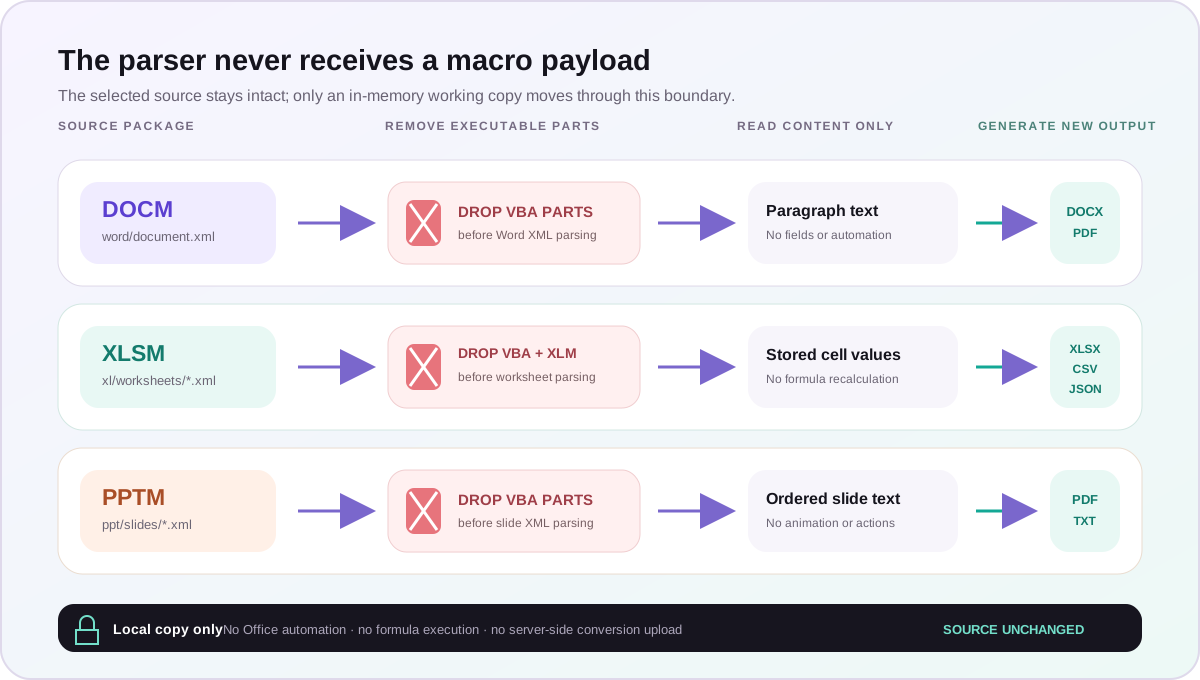
Novus Convert reads the package into browser memory and removes known Word, Excel, and PowerPoint VBA project parts before any content parser runs. It also removes Excel 4.0 macro-sheet parts so they cannot be mistaken for ordinary worksheet data. The converter does not interpret VBA, call Office, evaluate formulas, follow external references, or copy a macro project into the result. The original file on disk is not rewritten; the download is a newly generated representation of the readable content.
Choose an output for the content you need#
For Word prose, DOCM to DOCX creates a new macro-free document from extracted text, while DOCM to PDF provides a review copy and DOCM to TXT is the narrowest readable export. These are content reconstructions, not pixel-perfect Word round trips: complex headers, comments, tracked changes, fields, embedded objects, styles, and exact pagination may not survive.
For workbook data, XLSM to XLSX rebuilds worksheets from their stored cell values. XLSM to CSV is appropriate for a simple interoperable table, while XLSM to JSON keeps named sheets in a structured export. The reader does not recalculate formulas; it uses values already cached in the package. Charts, styles, conditional formatting, data validation, external connections, and automation are outside this extraction contract.
For a presentation, PPTM to PDF turns the ordered slide text into a reviewable document, and PPTM to TXT produces a simple text record. The extraction does not reproduce slide composition, theme, transitions, media, speaker timing, or interactive actions. Use it to inspect and recover words, not to promise a visually equivalent macro-free deck.
A cautious inspection workflow#
Separate inspection from preservation. The newly generated file is useful for reading or handing off recovered content, but it is not a forensic duplicate and does not retain the executable logic that may explain how an automated document behaved. When provenance matters, store the original under access controls, keep its checksum, and document which route and date produced the review copy. When the content is ordinary business material, still avoid overwriting the source until a trusted owner confirms that the extracted headings, sheets, slide order, and values meet the intended purpose. That small audit trail prevents a safer derivative from being confused with the authoritative record.
- Preserve the received file unchanged, and record its sender, source, filename, byte size, and checksum when the context is sensitive.
- Choose the narrowest output that answers the immediate question: plain text for reading, CSV for one table, JSON for structured sheets, or a rebuilt Office/PDF copy for handoff.
- Convert a single file locally and read every limitation or validation message before downloading.
- Open the result in a separate trusted reader and confirm headings, slide order, sheet names, row counts, and representative values.
- Quarantine or retain the original according to organizational policy; do not replace evidence or an authoritative workbook with the extracted copy.
Know what cannot be recovered#
Macros can generate content dynamically, refresh external data, calculate values, or change a document when Office opens it. A non-executing reader intentionally cannot reproduce those effects. An XLSM may therefore contain stale cached formula results; a DOCM field may show old text; a PPTM may rely on automation to populate a slide. The safe response is not to enable code casually. Ask the owner for an approved macro-free export or run the source in an organization-managed analysis environment when business logic itself must be investigated.
Encrypted or password-protected packages cannot be inspected without authorized decryption, and malformed or incomplete ZIP structures should be rejected. Very large or deliberately sparse workbooks are also bounded before they can exhaust browser memory: the local reader limits workbook size, sheet count, addressed cells, and columns. If a legitimate file exceeds those limits, use the trusted source application or a controlled enterprise workflow instead of weakening the browser boundary.
Troubleshooting
Do not attempt a bypass. Ask the authorized owner to decrypt and export a macro-free copy in a trusted application.
Use the result only for its documented text or value contract, or request a trusted PDF, DOCX, XLSX, or PPTX export from the source owner.
The reader never runs formulas or refreshes connections. Confirm values with an approved source-system export rather than enabling unknown automation.
Use an organization-managed desktop or analysis environment; do not weaken size, sheet, cell, or column bounds for an untrusted source.
Frequently asked questions
Does converting a DOCM, XLSM, or PPTM run its macros?
No. Known VBA project and Excel macro-sheet parts are removed from the in-memory package before the content reader runs. The converter does not interpret VBA, call Office, or evaluate macro code.
Does the converted output still contain macros?
No supported output receives the source macro project. Outputs are newly generated from extracted document text, worksheet values, or slide text rather than copies of the macro-enabled package.
Will DOCM to DOCX preserve the original Word layout?
Not exactly. It reconstructs a macro-free document from readable text. Complex styles, fields, comments, tracked changes, headers, embedded objects, and pagination can differ or be absent, so compare against an approved reference.
Will XLSM conversion recalculate formulas?
No. It reads cell values stored in the workbook and does not execute VBA, Excel 4.0 macro sheets, formulas, or external connections. Cached results can be stale if the source was not recalculated before saving.
Is the macro-free output guaranteed harmless?
No. Removing executable macro parts addresses that specific risk, but visible content, hyperlinks, embedded claims, and downstream handling still require review. The converter is not an antivirus or a replacement for organizational incident-response policy.