How to Choose an Output Format for Compatibility, Quality, and Size
Choose a conversion target by balancing where the file must open, which details must survive, and how small the result genuinely needs to be.

The best output format is not the newest format or the one with the smallest sample file. It is the format that reaches the intended person or application without discarding something the job needs. A photo for a website, a logo for a printer, a spreadsheet for analysis, and a document for long-term review have different definitions of success. Start with the destination, name the properties that must survive, and treat file size as one constraint among several rather than the only score.
Ask where the result must work#
Compatibility is a claim about a particular destination. Before converting, list the browsers, phones, desktop applications, editing tools, print systems, or archive policies that must accept the result. The compatibility explorer can suggest common, editable, web-focused, compact, and broadly compatible targets from the live conversion registry. A suggestion is a starting point, not permission to skip testing in the oldest or most important destination.
- For a recipient you do not control, prefer a widely supported target such as JPG, PNG, PDF, MP4, MP3, ZIP, or CSV when its feature limits fit the work.
- For continued editing, preserve structure: use SVG instead of a flattened logo, XLSX instead of CSV for a multi-sheet workbook, or an editable document format instead of page images.
- For a controlled modern workflow, a newer target such as AVIF, WebP, Opus, or Parquet can be worthwhile after every required reader has been tested.
- For preservation, keep the original source even when the delivery copy is intentionally simpler and more compatible.
Define the quality that actually matters#
Quality is not one slider. For an image it may mean fine texture, transparency, color, layers, or exact pixels. For audio it may mean speech intelligibility, channel layout, or lossless samples. Documents can need searchable text, working links, fonts, page geometry, comments, or formulas. Data files may need types, precision, schemas, row order, and leading zeros. Write down the important properties before choosing a target, because no encoder can preserve a feature the destination format cannot represent.
Estimate size without promising an exact number#
Output size depends on content, dimensions, duration, codec settings, metadata, and how efficiently the source was already encoded. That is why the finder shows approximate ranges rather than a false exact prediction. A noisy photograph compresses differently from a flat illustration; a talking-head video differs from a sports clip; a scanned PDF differs from a text-first PDF. Use the estimate to compare directions, then run a representative sample through Novus Convert and inspect the measured result.
- Set the hard delivery limit, such as an email attachment ceiling, upload cap, or device-storage budget.
- Keep dimensions, duration, pages, and frame rate at the minimum the destination genuinely needs.
- Choose a format the destination opens reliably, then adjust quality within that format.
- Compare a representative output at its real viewing size, not only while zoomed in or from the byte count.
- If it is still too large, decide which property can be reduced rather than repeatedly transcoding the same lossy result.
Use a practical family shortcut#
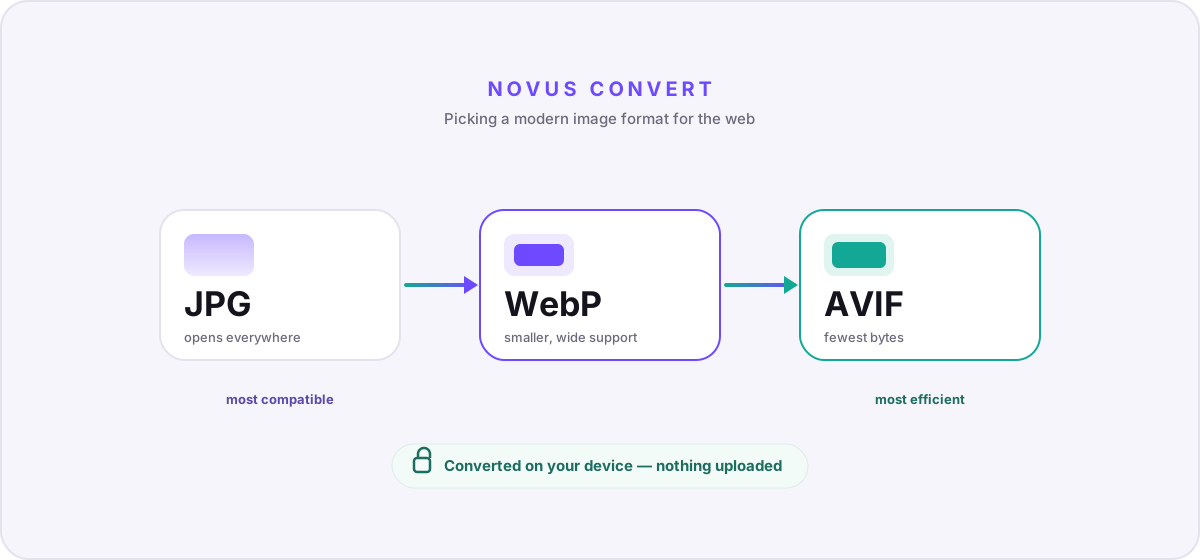
For photographs, JPG remains a dependable compatibility baseline, WebP often reduces delivery size, and AVIF can be smaller in modern environments; PNG is the safer choice for sharp graphics or transparency, while SVG is preferable when the source is truly vector. For video, H.264 in MP4 is a common delivery baseline, while WebM can suit browser-controlled distribution. For audio, MP3 maximizes legacy reach, AAC fits many modern media workflows, and FLAC is useful when lossless samples matter. These are defaults to test, not universal winners.
For documents, PDF is strong when appearance and review matter, but it is not a substitute for an editable source. DOCX, ODT, PPTX, and XLSX retain more application structure. CSV is intentionally simple and interoperable for one flat table, while JSON handles nested data and Parquet is efficient for typed analytical columns. ZIP is broadly understood for packaging; specialized archives may improve size or platform integration at the cost of reader availability.
Resolve conflicts in the right order#
When the goals conflict, prioritize the requirement that cannot be repaired later. An incompatible file cannot be opened. Missing transparency, formulas, vector paths, or precision cannot be recreated from a flattened delivery copy. A file that is merely larger than ideal can often be compressed again from the preserved original. In most workflows the order is destination compatibility, required fidelity, then size optimization. Regulated archives and exact scientific data may place fidelity first, but they still need a documented reader.
Verify the output before replacing anything#
Convert one representative source, reopen the output in an independent application, and compare the properties you listed. Confirm dimensions, pages, duration, tracks, transparency, formulas, record counts, or geometry as appropriate. Review the converter's warnings and SHA-256 value, then follow the full post-conversion verification checklist. Keep the source until the destination and a backup have accepted the result. A delivery format is usually an export, not a new master.
Troubleshooting
Return to the compatibility requirement and choose the most modern format every required destination actually supports.
Choose a target capable of representing that feature and reconvert from the untouched original.
Reduce dimensions, duration, frame rate, pages, metadata, or quality from the original instead of repeatedly transcoding a lossy copy.
Frequently asked questions
Which output format is compatible with everything?
No format covers every workflow. JPG, PNG, PDF, MP4, MP3, ZIP, and CSV are common baselines in their families, but each has feature limits and still needs testing in the actual destination.
Does a newer format always produce a smaller file?
No. Content and encoder settings matter, and an already efficient source may not shrink. Newer codecs can improve efficiency, but only when the destination supports them and the chosen settings fit the content.
Should I choose lossless whenever possible?
Choose lossless when exact samples or pixels matter and the size is practical. It still may not preserve layers, formulas, metadata, or application-specific structure, so check the full feature set.
Can I delete the original after converting?
Keep it until the output has been independently reopened, accepted by its destination, and backed up. Many delivery formats intentionally discard information that cannot be recovered later.