Browser-Based vs Online File Converters: Privacy, Speed, and Limits Compared
“Online converter” and “browser-based converter” sound identical but work in opposite ways. Here is how they compare on privacy, speed, file limits, and reliability — and when each one wins.
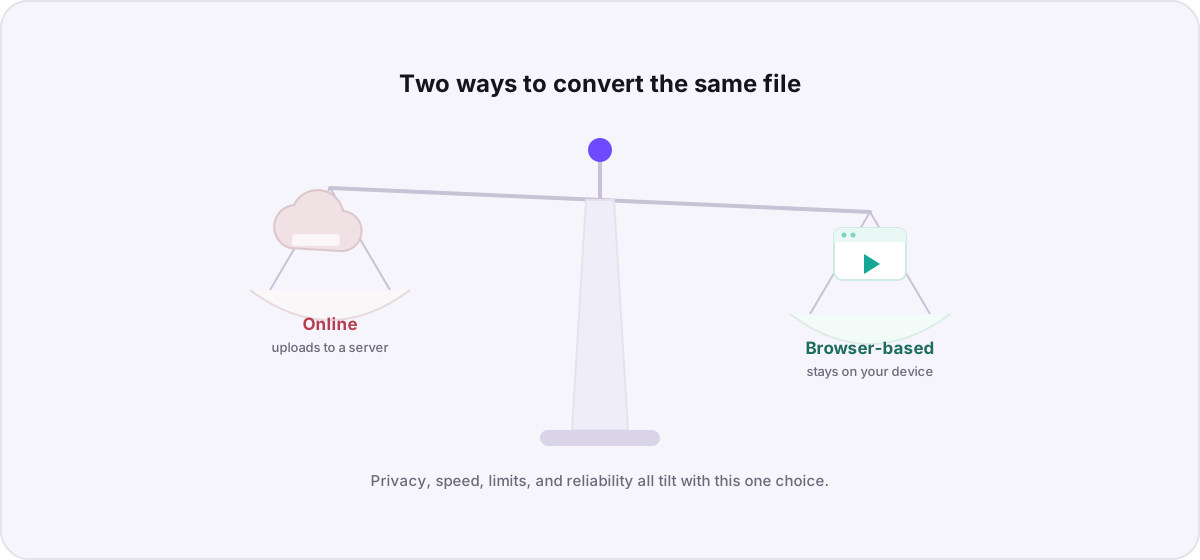
The phrases sound interchangeable, but they describe opposite architectures. A traditional “online converter” does the work on a remote server, so your file has to travel there and back. A “browser-based converter” does the work on your own device, so your file never leaves. That single difference ripples out into privacy, speed, file limits, and reliability. Here is how the two actually compare.
Privacy: the decisive difference#
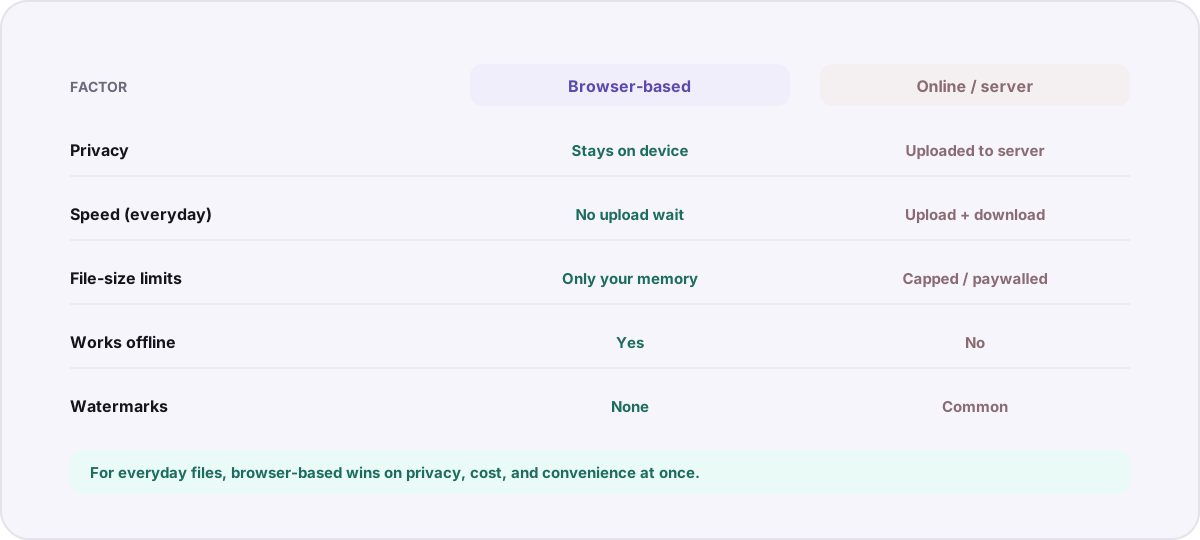
This is where the two approaches diverge most. Server-based tools require a full copy of your file to be uploaded, which puts it — and any metadata it carries — on infrastructure you neither own nor can audit. Browser-based tools read the file into local memory and process it there, so nothing is transmitted. We cover the implications in depth in where your files really go, but the short version is simple: the file that is never uploaded cannot be logged, leaked, or retained.
Speed: it depends what you are measuring#
Neither model is universally faster; they are fast in different ways.
- Server-based tools do the actual computation on powerful hardware, but you pay for two network trips — uploading your file and downloading the result. On a slow connection or a large file, that transfer dominates and the whole thing feels sluggish.
- Browser-based tools skip the network entirely, so small files are essentially instant. For heavy work like video transcoding, your own device does the encoding, which can be slower than a server farm — but you are never waiting on an upload.
File limits: who is imposing them?#
Online converters almost always cap upload size, and often gate larger files, batch conversions, or format options behind a paid tier — because every upload costs them bandwidth and compute. Browser-based converters have no such incentive: there is no server bill per file. Their only real limit is your device’s available memory, which is why Novus Convert can handle large media and whole batches at once without a paywall. You can add a mixed queue and convert everything in a single pass on the private batch converter.
Reliability and offline use#
A server-based tool depends on that server being online, funded, and not overloaded — free converters have a habit of disappearing or throttling when they get popular. Browser-based conversion runs on code your browser has already loaded, so it keeps working even if your connection drops mid-task, and it is not at the mercy of someone else’s uptime.
Watermarks and hidden costs#
Watermarks, forced sign-ups, and “upgrade to remove limits” prompts are artifacts of the server model, where the operator needs to recoup infrastructure costs. Because browser-based tools do not carry that cost per conversion, they can stay free without degrading the output. When you compress a video or convert an image locally, what you get back is the real file — no stamp in the corner.
When does an online converter still make sense?#
To be fair, the server model is not obsolete. A few conversions genuinely need format libraries too heavy to run in a browser, or benefit from serious server horsepower on a single massive file. And if a file is already public and you are on a low-powered device, the privacy trade-off may not matter to you. But for the everyday work of turning HEIC into JPG, shrinking a clip, or reformatting a document, the browser-based approach wins on privacy, cost, and convenience at the same time.
The bottom line#
Choose a browser-based converter when privacy matters, when you want no upload wait or file-size paywall, or when you simply want a tool that keeps working. Reach for a server-based one only for the rare heavy job that genuinely needs it. If you want to see what runs entirely on your device today, browse the full list of working conversions.
Troubleshooting
An online (server-based) converter uploads your file to a remote server, converts it there, and sends it back. A browser-based converter does the conversion on your own device using code your browser has loaded, so the file never leaves your machine. The names sound similar but the architectures are opposite.
For everyday files they usually feel faster because there is no upload or download step. For very heavy jobs like transcoding a large video, a server farm can out-compute your device — but you never wait on a network transfer, which is often the slowest part of the server model.
Every upload costs the operator bandwidth and server compute, so they cap sizes and gate larger files or batches behind paid plans to control costs. Browser-based tools have no per-file server cost, so their only real limit is your device’s memory.
Frequently asked questions
What is the difference between an online converter and a browser-based converter?
An online (server-based) converter uploads your file to a remote server, converts it there, and sends it back. A browser-based converter does the conversion on your own device using code your browser has loaded, so the file never leaves your machine. The names sound similar but the architectures are opposite.
Are browser-based converters slower than server ones?
For everyday files they usually feel faster because there is no upload or download step. For very heavy jobs like transcoding a large video, a server farm can out-compute your device — but you never wait on a network transfer, which is often the slowest part of the server model.
Why do online converters limit file sizes?
Every upload costs the operator bandwidth and server compute, so they cap sizes and gate larger files or batches behind paid plans to control costs. Browser-based tools have no per-file server cost, so their only real limit is your device’s memory.
Do browser-based converters work offline?
Once the page has loaded, a browser-based converter runs on code already in your browser, so it can keep converting even if your connection drops. A server-based converter stops working the moment it cannot reach its server.
Is a browser-based converter always the better choice?
For most everyday conversions it wins on privacy, cost, and convenience. The exceptions are rare heavy jobs that need format libraries too large for a browser or serious server horsepower on a single massive file. For those, a well-run server tool can still be the right pick.