JPG vs PNG vs WebP vs AVIF vs HEIC: Which Image Format Should You Use?
A practical comparison of the five image formats that matter most today — how they differ in compression, quality, transparency, and support — with clear guidance on when to pick each.
There is no single “best” image format — there is only the best format for a particular job. Pick wrong and you end up with bloated pages, blurry logos, or files nobody can open. This guide compares the five formats you are most likely to run into today, and gives you a simple rule for each.
The short version#
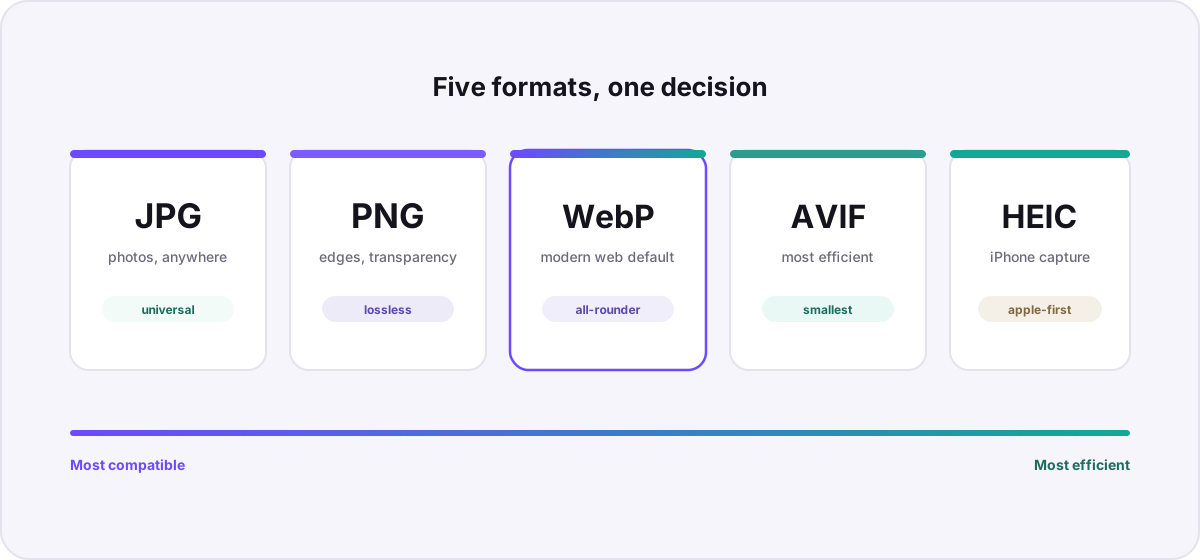
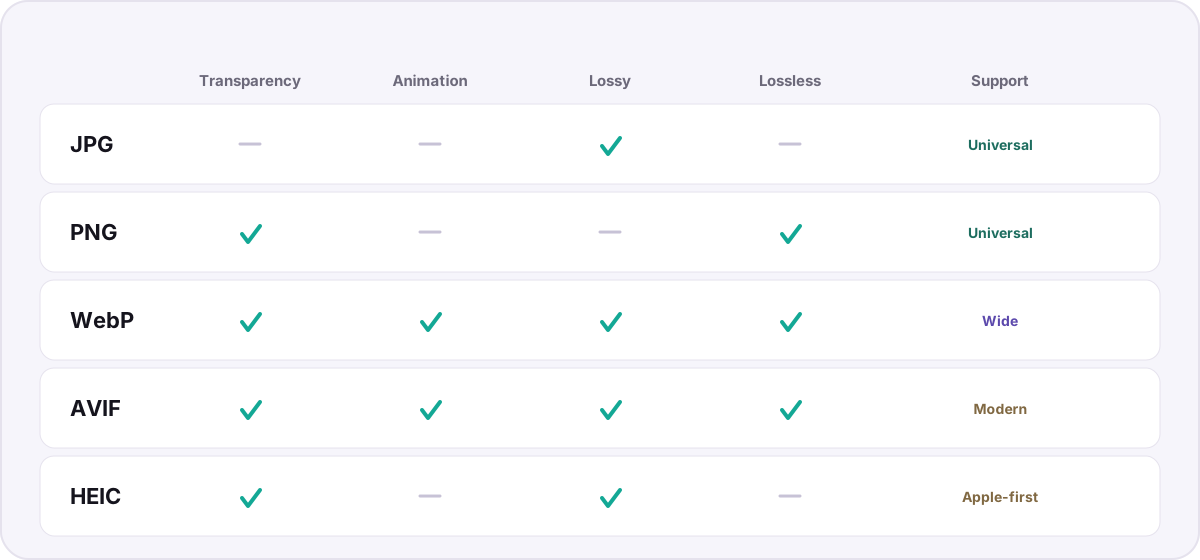
- JPG — photographs you need to share anywhere. Universal, small, lossy, no transparency.
- PNG — logos, screenshots, and anything with sharp edges or transparency. Lossless, larger.
- WebP — the modern web default: smaller than JPG and PNG, does both lossy and lossless, supports transparency.
- AVIF — the efficiency champion for the web when you can afford newer support. Excellent quality per byte.
- HEIC — what your phone captures. Superb on Apple devices, awkward everywhere else.
JPG: the universal default#
JPG (or JPEG) has been the workhorse of digital photography since 1992. Its lossy compression throws away detail the human eye is unlikely to miss, which is why a 12-megapixel photo can fit in a couple of megabytes. Its superpower is not efficiency — newer formats beat it comfortably — but reach. Every browser, phone, printer, and upload form on Earth accepts a JPG. If you need a photo to just work, this is still the answer.
The trade-offs: JPG has no transparency, and repeatedly editing and re-saving it degrades quality with each pass. Use it for final photographic exports, not as a working format for graphics.
PNG: sharp edges and transparency#
PNG is lossless, meaning it reproduces every pixel exactly, and it supports a full alpha (transparency) channel. That makes PNG the right choice for logos, icons, screenshots, diagrams, and any image with crisp lines or text you cannot afford to see smeared by lossy compression. The cost is size: a photograph saved as PNG can be five to ten times larger than the same image as JPG, because photographic detail does not compress losslessly nearly as well.
WebP: the modern web all-rounder#
Google’s WebP format is the pragmatic modern default for websites. It offers both lossy and lossless modes, supports transparency and animation, and typically produces files 25–35% smaller than an equivalent JPG or PNG at similar quality. Support is now effectively universal across current browsers, which is why so many sites serve WebP. Converting your PNGs to WebP or JPGs to WebP is one of the easiest wins for page speed.
AVIF: the efficiency champion#
AVIF is built on the AV1 video codec and is currently the most efficient widely-available image format: it routinely beats WebP and crushes JPG at the same visual quality, while supporting transparency, wide color, and high dynamic range. The trade-offs are encoding speed (it is slower to compress) and support that, while good in modern browsers, is not yet as bulletproof as JPG. Use AVIF when byte-for-byte quality matters and your audience is on current software; keep a JPG or WebP fallback for the long tail.
HEIC: great on Apple, awkward elsewhere#
HEIC is what your iPhone captures by default. Technically it is superb — roughly half the size of JPG at similar quality, with support for depth maps and Live Photos — but it is an Apple-centric container that many non-Apple tools and websites still refuse. For anything you need to share broadly, convert it: our step-by-step HEIC to JPG guide covers the private, browser-based way to do it. You can read more about the format on its HEIC reference page.
So which should you use?#
- Sharing a photo with anyone, anywhere → JPG.
- Logo, icon, screenshot, or anything needing transparency → PNG.
- Images on a website you control → WebP (or AVIF with a fallback).
- Squeezing maximum quality into minimum bytes → AVIF.
- A file straight off an iPhone that needs to go elsewhere → convert HEIC to JPG or PNG.
Whatever you choose, you can move between all of these formats privately in your browser. Browse the full format directory to see everything Novus Convert supports, or jump straight into the converter.
Troubleshooting
For images on a website you control, usually yes — WebP produces smaller files than JPG at similar quality and also supports transparency and animation. For a photo you need to guarantee opens everywhere, including older or unusual software, JPG remains the safer universal choice.
AVIF compresses more efficiently and supports HDR and wide color, but it encodes slower and its support, while good, is slightly less universal than WebP. A common approach is to serve AVIF with a WebP or JPG fallback so every visitor gets a working image.
Use PNG whenever the image has sharp edges, text, flat color, or transparency — logos, icons, screenshots, and diagrams. JPG’s lossy compression smears fine detail and cannot store transparency, so those images look noticeably worse as JPG.
Frequently asked questions
Is WebP better than JPG?
For images on a website you control, usually yes — WebP produces smaller files than JPG at similar quality and also supports transparency and animation. For a photo you need to guarantee opens everywhere, including older or unusual software, JPG remains the safer universal choice.
Should I use AVIF or WebP?
AVIF compresses more efficiently and supports HDR and wide color, but it encodes slower and its support, while good, is slightly less universal than WebP. A common approach is to serve AVIF with a WebP or JPG fallback so every visitor gets a working image.
When should I use PNG instead of JPG?
Use PNG whenever the image has sharp edges, text, flat color, or transparency — logos, icons, screenshots, and diagrams. JPG’s lossy compression smears fine detail and cannot store transparency, so those images look noticeably worse as JPG.
Does converting between formats lose quality?
Converting to a lossy format (JPG, WebP, AVIF, HEIC) re-compresses the image, which can lose a little detail. Converting to or between lossless formats (PNG) preserves every pixel. To avoid stacking losses, convert from your highest-quality original rather than from an already-compressed copy.
Can I convert these formats without uploading my images?
Yes. Novus Convert decodes and re-encodes images entirely in your browser’s memory, so you can move between JPG, PNG, WebP, AVIF, and HEIC without any file ever being uploaded to a server.