TIFF: What Archives Scan To, and What Comes Out the Other Side
TIFF is the default output of scanners and digitisation projects, and it is really a container of tagged images rather than a picture. What multi-page means, which compression variants exist, and what a conversion honestly gives you.
A TIFF is what you get when a scanner is told not to lose anything. Museums, land registries, hospitals and legal archives all standardised on it, and the reason is structural rather than sentimental: the format describes whatever the pixels happen to be instead of assuming a particular kind of picture.
That flexibility is also the problem. Two files with the same extension can differ from each other more than a JPEG differs from a PNG, and a reader that opens one may refuse the other outright. Working out which kind of TIFF you actually have is most of the job.
Tagged image file directories#
The name is literal. A TIFF opens with a two-byte order mark, II for little-endian or MM for big-endian, and then a pointer to an image file directory. That directory is a list of numbered tags: width, height, bits per sample, compression, photometric interpretation, and where the pixel strips sit in the file. A reader walks the tags it understands and is meant to skip the rest.
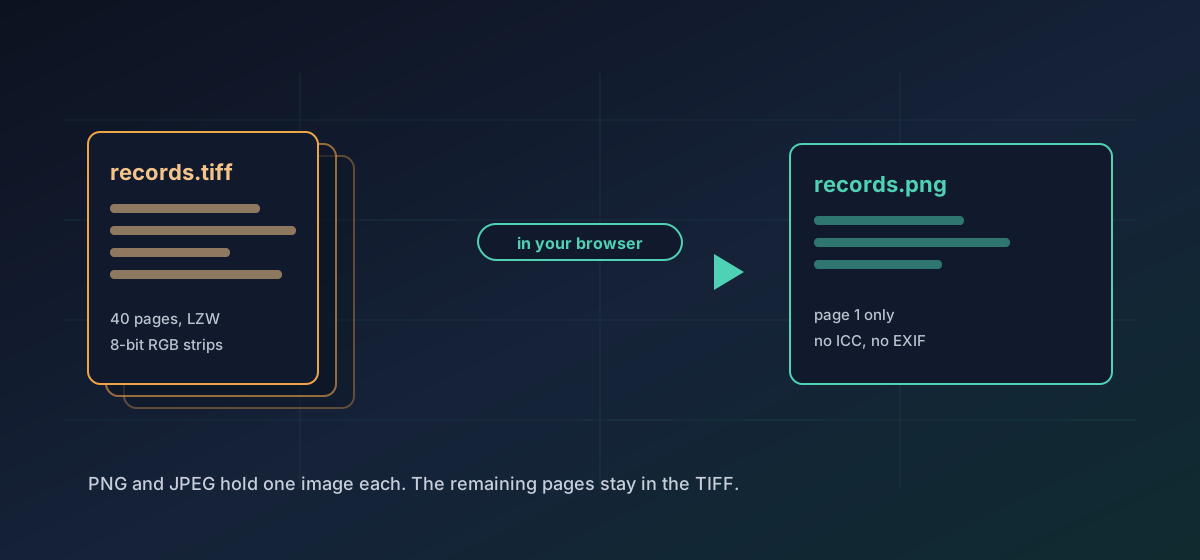
Because one directory can point at the next, a single file can hold many images. That is what people mean by a multi-page TIFF, and it is how a forty-page scanned contract arrives as one attachment. The .tif and .tiff spellings are the same format; the three-letter form is a leftover from MS-DOS filename limits, and renaming between them changes nothing at all.
Multi-page files and the page you actually get#
Converting a multi-page TIFF meets an obvious wall: PNG and JPEG hold exactly one image each. Convert TIFF to PNG and convert TIFF to JPG both export the first image in the file. The other pages are not damaged and not altered. They are simply not in the output.
The compression variants#
TIFF does not have a compression scheme. It has a tag that names one, and the list is long. Every option below is legal, and every one of them produces a file called .tiff:
- None. Raw pixel strips: large, predictable, and the safest thing to hand a simple reader.
- PackBits. A run-length scheme from the early Macintosh era. Cheap, lossless, and close to useless on photographs.
- LZW. The same dictionary method GIF uses. Effective on flat artwork and common in prepress work.
- Deflate, often labelled ZIP. The method PNG uses, and usually the strongest of the lossless options.
- CCITT Group 3 and Group 4. One bit per pixel, built for fax and document scanning. Very small files, bilevel only.
- JPEG inside the TIFF wrapper. Lossy pixels in an archival container, which rather defeats the point of choosing TIFF.
The decoder here reads top-left oriented 8-bit RGB and RGBA images with contiguous strips, stored uncompressed or with LZW, Deflate or PackBits. Anything outside that set is refused with a message rather than converted badly: bilevel fax scans, CMYK prepress masters, 16-bit and floating-point scientific data, tiled layouts, planar channel storage and BigTIFF all stop at the door. That is deliberate, and it follows the principle in verifying conversion results. A refusal you can read beats a silently wrong colour conversion you cannot.
What does not survive#
- Extra pages. One image comes out, whatever went in.
- Embedded ICC profiles. Output colour is written as ordinary sRGB, so a contractual prepress match is not guaranteed.
- EXIF, XMP and IPTC blocks, including scanning provenance, operator notes and rights fields.
- Nothing beyond that is silently degraded. A 16-bit archival scan is not quietly reduced to 8 bits behind your back, because a file at that depth is refused rather than converted.
- CMYK separations stop at the door for the same reason, rather than being approximated in RGB and handed back looking plausible.
None of that is an argument against converting. It is an argument for keeping the TIFF and treating the result as a delivery copy, which is exactly the habit described in PSD, EXR and HDR. The TIFF format reference sets out the variants in more detail.
Picking a target#
For a scanned photograph going to email or a website, JPG at a high quality setting is usually right and is dramatically smaller. For text, line art, plans or anything with large flat areas, PNG is the better answer, because JPEG artefacts cluster exactly where the edges are. Image formats compared sets the trade-off out in full.
Going the other way is possible too, and worth one caveat. Producing a TIFF from a web image gives you the container and the lossless storage, but it cannot invent the bit depth, the colour profile or the scan resolution that the original never carried. A TIFF made from a JPEG is a lossless copy of a lossy image, not an archival master.
Troubleshooting
Expected. PNG and JPEG hold one image each, so the first image in the directory chain is exported. Split the TIFF into pages in a document application if you need all of them.
The decoder reads 8-bit RGB and RGBA with contiguous strips and no, LZW, Deflate or PackBits compression. Bilevel fax scans, CMYK, 16-bit, tiled and BigTIFF files fall outside that. Re-save as an 8-bit RGB TIFF from the application that produced it.
The embedded ICC profile is not carried into the output and CMYK cannot be represented. Do the colour-managed export in prepress software rather than through a raster conversion.
PNG is lossless, so a photographic scan stays big. Use JPG for photographs and keep PNG for text, line art and flat colour.
The bytes are identical and the extension is cosmetic. Renaming resolves it without touching the image data.
Frequently asked questions
Why did only one page of my multi-page TIFF convert?
Because PNG and JPEG each hold a single image. The first image in the file is exported and the rest stay in the TIFF, untouched. Split the pages first if you need every one of them.
Which TIFF compression is best for an archive?
Deflate or LZW for continuous-tone material, because both are lossless and reduce size meaningfully. Avoid JPEG-in-TIFF for archival copies: it puts lossy pixels inside a container chosen precisely to avoid them.
Is .tif different from .tiff?
No. The bytes are the same format. The three-letter spelling is a leftover from MS-DOS filename limits and stayed the default on Windows scanning software. Renaming between the two is always safe.
Will my 16-bit scan stay 16-bit?
No. Ordinary web image formats carry 8 bits per channel, so a 16-bit scan is reduced on the way out. Keep the TIFF as the master if that extra depth matters for later editing.
Does the scan get uploaded anywhere?
No. The conversion runs in your browser. A scanned contract or medical record is never transmitted and no server holds a copy of it.