BMP and TGA: The Raster Formats That Never Learned to Compress
Two uncompressed image formats from the 1980s that refuse to disappear: one lives on in Windows tooling and test fixtures, the other in game texture pipelines. Why both persist, and what changes the moment you convert one.
BMP and TGA both predate the web, both store pixels essentially as they are, and both are still produced daily by software that has every modern alternative available. That is not inertia. Each one survives because a specific group of people wants something that compression takes away.
Understanding what that something is makes the conversion decision simple, and it explains why the honest answer to whether you should convert is sometimes no.
BMP: pixels written straight to disk#
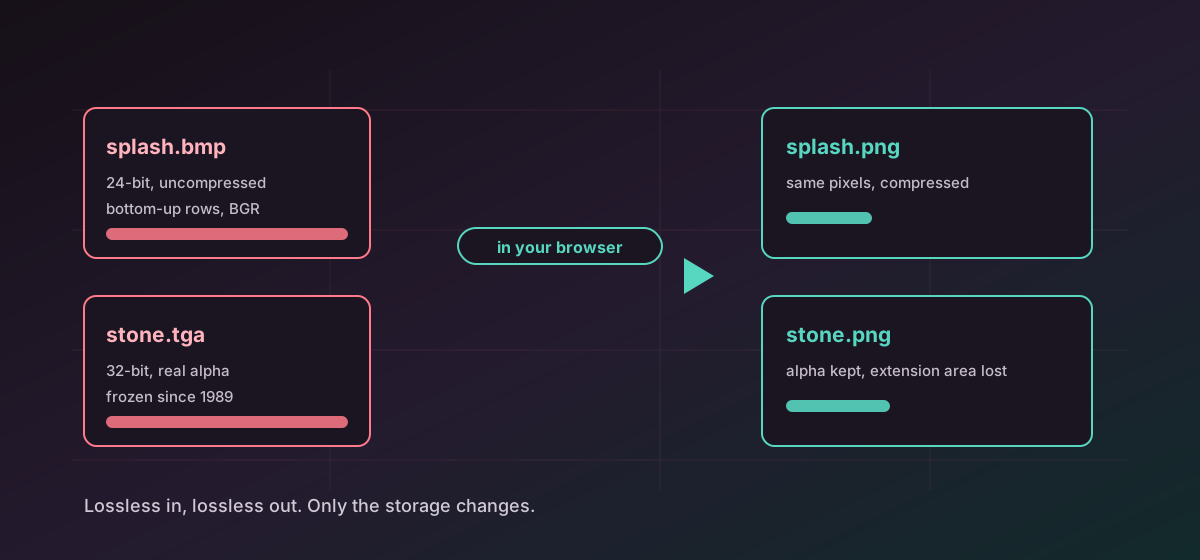
Microsoft introduced the device-independent bitmap so Windows applications could exchange raster data regardless of display hardware, and the format has barely changed since. A short file header, an information header describing the dimensions and bit depth, an optional palette, and then the rows. File size is arithmetic: width times height times bytes per pixel, plus a few dozen bytes.
Two details catch people out. Rows are stored bottom-up by default, so a naive reader produces a vertically flipped image. Channels are ordered blue, green, red rather than the usual red, green, blue, which is why a careless implementation renders skin tones sky blue. Neither is a defect in the file.
The decoder here accepts uncompressed 24-bit and 32-bit bitmaps. Run-length encoded 4-bit and 8-bit palette variants, and the older 1-bit and 16-bit forms, are refused with a message rather than guessed at. If a file is rejected, re-saving it as a 24-bit bitmap from any image editor resolves it. Convert BMP to PNG is the usual destination, because PNG is also lossless and is normally a fraction of the size.
TGA: the texture format games kept#
Truevision created TARGA in 1984 for video capture boards that brought 24-bit colour to PCs years before it was common. The hardware is long gone. The format stayed, because it does three things game and 3D pipelines care about: it is lossless, it carries a real 8-bit alpha channel in its 32-bit form, and it is frozen.
That last point matters more than it sounds. A texture pipeline is a chain of tools from several vendors across many years, and a format that has not changed since 1989 never introduces a variant that breaks the chain. Artists tolerate large files precisely because nothing surprising happens to them.
TGA offers optional run-length encoding, which is lossless and helps on flat artwork. The decoder here reads uncompressed 24-bit and 32-bit true-colour images, including both row-origin flags, and refuses colour-mapped and run-length encoded variants rather than mishandling them. Convert TGA to PNG keeps the alpha channel intact; convert TGA to JPG does not, because JPEG has no alpha at all.
What does not survive either conversion#
- Alpha, if the target is JPEG. Transparent pixels become opaque, usually black or white, and there is no way back.
- The TGA 2.0 extension area: author name, timestamp, job identifier and the gamma value. None of it has anywhere to go in a PNG.
- Any assumption about colour space. Neither format declares one, so colour is treated as sRGB by convention rather than by a stated rule.
- Palette indices, where a source had them. Output is full colour, so an artist who was editing the palette itself loses that handle.
- The predictable file size. A compressed target is smaller, but no longer a simple multiplication, which matters if a tool downstream was relying on the arithmetic.
The reverse direction is genuinely useful and less often considered. Convert PNG to TGA when a 3D or game tool insists on it, and convert PNG to BMP when an embedded device or an old Windows utility cannot decode anything. Both are lossless, so nothing degrades on the way in.
When not to convert#
If a TGA is a source texture inside a working art pipeline, leave it alone. The size is the price of the guarantee, and converting the master to PNG to save disk space trades a known quantity for a small saving. Convert the delivery copy instead. The same reasoning appears in image formats compared, and the TGA format reference and BMP format reference list the variants each one supports.
Troubleshooting
Uncompressed 24-bit and 32-bit bitmaps are supported. Run-length encoded, 1-bit, 4-bit, 8-bit and 16-bit variants are not. Re-save as a 24-bit BMP from any image editor.
Colour-mapped and run-length encoded TGA files are refused rather than decoded incorrectly. Export an uncompressed 24-bit or 32-bit true-colour TGA from the tool that created it.
The target was JPEG, which has no alpha channel. Convert to PNG or WebP instead if the transparency matters.
BMP stores rows bottom-up and TGA flags its row origin in the header. The conversion honours both, so a flipped result points at the other application, not the source file.
PNG compression is lossless. The pixels are identical; only the storage changed. Compare the two files side by side at full zoom if you want to confirm it.
Frequently asked questions
Is converting BMP to PNG lossy?
No. Both formats are lossless, so every pixel value survives exactly. The file simply gets smaller, often dramatically, because PNG actually compresses and BMP does not.
Why do game studios still ship TGA textures?
Because it is lossless, carries a real alpha channel, and has not changed since 1989. A frozen format never introduces a variant that breaks a long tool chain, and that stability is worth more than disk space.
Does TGA keep transparency when converted?
To PNG or WebP, yes, the 8-bit alpha channel is preserved. To JPG, no, because JPEG has no alpha at all and transparent areas become opaque.
Why is my bitmap so large compared to a photo?
BMP stores pixels uncompressed, so the size is width times height times bytes per pixel. A photograph that would be two megabytes as a JPEG can easily be twenty as a bitmap.
Are my textures uploaded during conversion?
No. Everything runs in your browser. Unreleased art never leaves the machine and there is no server-side copy.