PBM, PGM and PPM: Image Formats You Can Write in a Shell Script
The Netpbm trio was designed in 1988 to be trivial, and that is precisely why it still turns up in scientific and machine-vision work. ASCII against binary, the maximum-value trap, and the inverted bit that quietly produces negatives.
Most image formats are the result of someone trying to make files smaller. The Netpbm trio is the result of someone trying to make files simpler. Jef Poskanzer released the pbmplus toolkit in 1988 so Unix programs could pipe images between each other without every pair of tools agreeing on a library, and the design goal was that you could write one from a shell script.
That goal was met so completely that the formats never needed replacing. Renderers, instruments, machine-vision pipelines and university courses still emit them, and a .ppm produced this morning is byte-compatible with a reader written in 1990.
Three rungs of one ladder#
- PBM, the portable bitmap: one bit per pixel, black or white, no grey and no colour. Magic numbers P1 and P4.
- PGM, the portable graymap: one intensity sample per pixel with the maximum value declared in the header. Magic numbers P2 and P5.
- PPM, the portable pixmap: three interleaved samples per pixel, red then green then blue. Magic numbers P3 and P6.
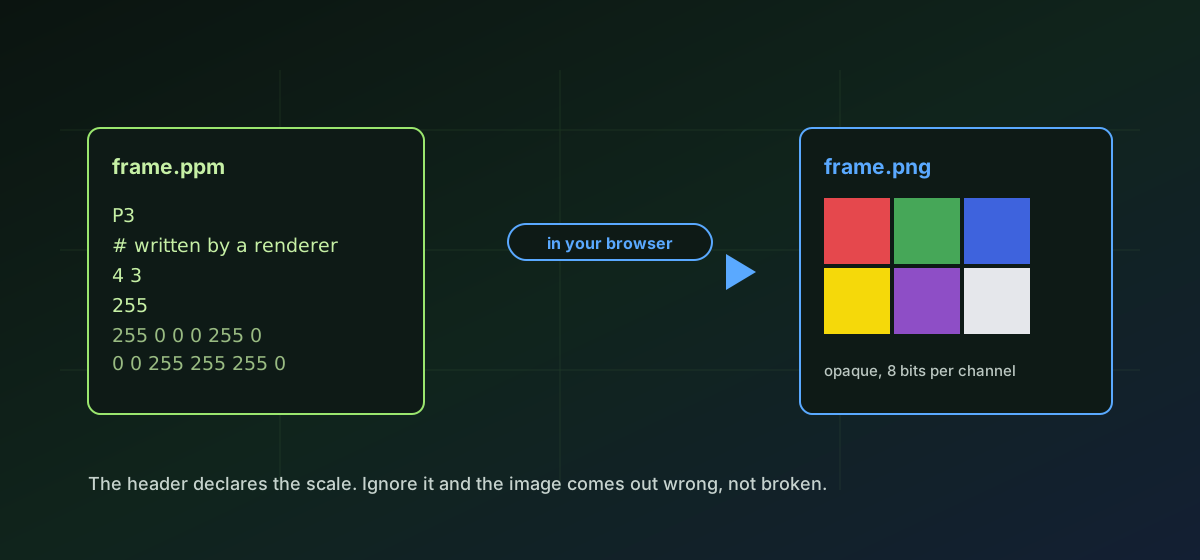
A file is a magic number, the width, the height, a maximum channel value for the greymap and pixmap, and then the pixels. Whitespace between header fields is free-form and a hash begins a comment that runs to the end of the line. There is nothing else in the file, which is the entire point.
ASCII against binary#
Each format ships in two encodings that share an extension. The lower magic number stores samples as whitespace-separated decimal integers you can open in a text editor and read with your eyes. The higher one stores them as raw bytes. Both describe exactly the same image; only the transcription differs.
The ASCII forms are wonderful for teaching and debugging and terrible for anything large, because a single grey value can occupy four characters instead of one byte. The binary forms are what production tools write. Convert PPM to PNG and convert PGM to PNG accept either encoding without being told which one you have, because the magic number already says.
The two traps#
PBM inverts the convention almost every other format uses: a bit value of 1 means black, not white. A reader that assumes otherwise produces a perfect negative, and because the image is still recognisable, the mistake survives review far more often than it should.
The greymap and pixmap trap is the declared maximum value. A PGM with a maxval of 1023 is not an image whose samples happen to stay under 1024. It is an image on a 0 to 1023 scale, and a reader that ignores the field renders it almost entirely black. Samples are scaled, not clipped. Convert PBM to PNG and its siblings honour both rules, which is a large part of why the output looks like the source rather than like a mistake.
What does not survive the conversion#
- Bit depth above 8 per channel. A 16-bit PGM or PPM is scaled down to 8 bits, which is usually fine for viewing and wrong for measurement.
- The header comments, including any provenance line an instrument wrote there. Nothing else in the file carries them.
- The exact sample scale. A maxval of 4095 becomes ordinary 0 to 255 output, so the original numeric range is no longer recoverable from the result.
- Nothing else, because nothing else was ever there. Netpbm has no EXIF, no ICC profile, no timestamp and no orientation flag.
- Transparency, which none of the three formats can represent in the first place: a PPM has no alpha channel, so output is fully opaque.
That last absence is worth stating plainly. If you need transparency, the source cannot have carried it and the conversion cannot add it. Compare the PPM format reference, the PGM reference and the PBM reference if you are unsure which of the three you have in hand.
Why convert at all#
No browser displays any of the three, and few consumer applications do either, so anything intended for a person to look at needs converting. PNG is the natural target: also lossless, vastly smaller, and universally supported. Where the image is photographic and the destination is email or a web page, PPM to JPG is smaller again at a quality cost you choose. Netpbm remains an excellent interchange format and a poor delivery one, and that is the whole decision.
Troubleshooting
PBM treats a bit value of 1 as black. If the result is inverted, the tool that wrote the file used the opposite convention. Invert it in an image editor after converting, and report the bug upstream.
The declared maximum value was not honoured by whatever produced the file, or the samples do not actually reach the declared maximum. Check the third header field against the real sample range.
The binary PBM row stride was miscalculated somewhere upstream. Each row is padded to a whole byte, so the padding bits have to be skipped at the end of every row, not carried into the next one.
These three routes read P1 through P6. A file beginning P7 is PAM, a later and more general member of the Netpbm family that these routes do not cover. Re-save it as a PPM or PGM with the Netpbm tools.
Expected. Ordinary raster targets carry 8 bits per channel. Keep the PGM or PPM as the measurement copy and use the converted image only for viewing.
Frequently asked questions
What is the difference between PBM, PGM and PPM?
Bit depth and channels. PBM is one bit per pixel, black or white. PGM is one greyscale sample per pixel. PPM is three samples per pixel for full colour. They share a header design and differ only in the magic number and the pixels.
Which is better, the ASCII or the binary form?
Binary for anything real, because ASCII can use four characters where a byte would do. ASCII is genuinely useful for teaching, debugging and small test fixtures, since you can read the pixels in a text editor.
Why does my PGM look too dark?
Almost always the maximum-value field. Samples are on the scale the header declares, so a reader that assumes 255 will render a 1023-scale image at roughly a quarter brightness. The values are scaled, not clipped.
Can a PPM hold transparency?
No. There is no alpha channel in any of the three formats, so a converted image is fully opaque. If you need transparency, it has to come from somewhere other than the Netpbm source.
Is my instrument data uploaded?
No. The conversion happens in your browser. Research or medical imaging output never leaves the device and no server receives a copy of it.