ICO and CUR: Containers Where the Hotspot Is the Whole Point
A Windows icon holds several images at once, and a cursor adds two numbers saying exactly where the click lands. What a conversion keeps, which image it picks out of the pile, and the coordinate that has nowhere at all to go.
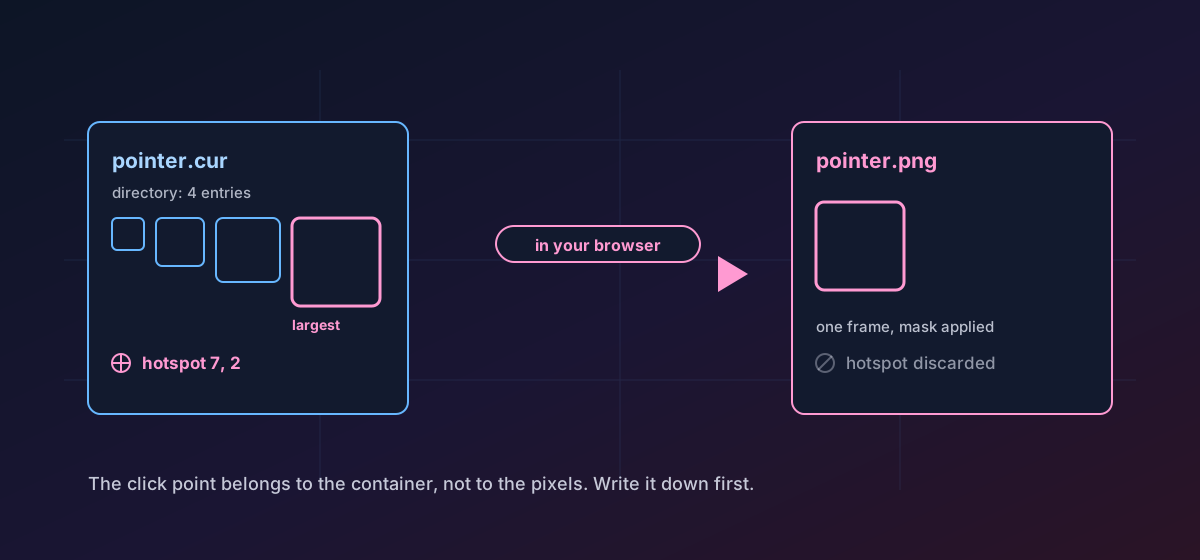
An .ico file is not an image and a .cur file is not a picture of a pointer. Both are directories: a small table at the front of the file listing several images at different sizes and colour depths, followed by the image data itself. Windows picks whichever entry suits the display scale and the context it needs the artwork for.
The two formats are nearly the same file. One field at offset 2 in the header holds 1 for an icon and 2 for a cursor, and that single value is the entire difference in identity. Mislabelling one as the other is common enough that a careful reader checks the field rather than trusting the extension.
The hotspot#
The second difference is the interesting one. In an icon, each directory entry carries two 16-bit fields describing colour planes and bit depth. In a cursor, those same two fields hold the hotspot: the exact pixel inside the image that counts as the click point. A crosshair clicks at its centre, an arrow at its tip, a text cursor at the middle of its bar.
Nothing else in common computing carries that idea. A PNG has no field for it, a JPEG has no field for it, and no raster format you might convert to has anywhere to put it. This is the honest limit of the conversion and it deserves to be said before anything else.
Two kinds of frame inside one container#
Each entry in the directory points at image data stored one of two ways. The legacy form is a headerless device-independent bitmap at 1, 4, 8, 24 or 32 bits per pixel, followed by a separate one-bit AND mask that says which pixels are transparent. Since Windows Vista, an entry may instead hold a complete PNG, which is how a 256-pixel icon stays a sensible size.
Both are read here. Convert ICO to PNG and convert CUR to PNG prefer an embedded PNG frame when one exists and fall back to decoding the legacy bitmap with its palette and mask when it does not. The mask is applied, so a converted icon has real transparency rather than a coloured background pretending to be empty.
One quirk worth knowing: the width and height in a directory entry are single bytes, so 256 is written as zero. A reader that takes the value literally decides a 256-pixel icon is zero pixels wide and either crashes or silently skips it. If a tool tells you an icon is empty, this is usually why.
Which image you get#
Because the output is a single image and the input is a pile of them, something has to choose. The largest usable frame wins: the biggest embedded PNG if any are present, otherwise the biggest supported bitmap frame. That is almost always what someone extracting artwork wants, and it is worth knowing rather than guessing.
- The other sizes are not exported. They remain in the source file, untouched, but they are not in the result.
- The 16-pixel version, which is frequently a separately drawn simplification rather than a scaled copy, is the one you are most likely to miss.
- Colour depth below the chosen frame is not merged in. There is no compositing across entries.
- A cursor with several sizes loses the size table along with the hotspot, for the same reason: both belong to the container.
Building one rather than opening one#
Convert PNG to ICO wraps your image as a single-entry icon with a PNG frame inside, which is the modern form and what browsers ask for. Note the word single: one image goes in and one entry comes out, and the ceiling is 256 pixels in each direction because the format has no way to describe a larger one. If you want an icon that holds several hand-tuned sizes, build each size and assemble them, which is the process set out in making a favicon that looks right at 16 pixels.
Going sideways is possible too. Convert CUR to ICO gives you the artwork in the icon container, which is useful for documentation and asset libraries, and drops the hotspot in the process for the reason described above. The ICO format reference and the CUR format reference list what each container can hold.
Troubleshooting
Expected, and unavoidable. The hotspot lives in the directory entry, not in the pixels, and no raster format has a field for it. Record the coordinates before converting if you plan to rebuild the cursor.
The output format holds one image, so the largest usable frame is exported. Extract the other sizes with a dedicated icon editor if you need them individually.
The type field is checked: 1 for an icon, 2 for a cursor. A cursor renamed to .ico fails this check. Use the route that matches what the file actually is.
Dimensions are single bytes in the directory, so 256 is stored as zero. A reader that takes zero literally skips the entry. This is a bug in that reader, not in the file.
The legacy bitmap frame carries transparency in a separate AND mask. If the mask was missing or the source was flattened before you received it, the background is now part of the image and has to be removed by hand.
Frequently asked questions
What is the difference between an ICO and a CUR file?
Two fields. The type value in the header is 1 for an icon and 2 for a cursor, and the two bytes that describe colour planes and bit depth in an icon carry the hotspot coordinates in a cursor. Everything else about the container is identical.
Can I keep the cursor hotspot when converting to PNG?
No. The hotspot is a container field and PNG has nowhere to store it. Note the coordinates before converting if you will need to reassemble the cursor afterwards.
Which size does the conversion export?
The largest usable frame in the file: the biggest embedded PNG if the container has any, otherwise the biggest supported bitmap frame. The remaining sizes stay in the source and are not part of the output.
Why is 256 pixels the maximum for an icon?
The directory stores width and height as single bytes, with zero standing in for 256. There is no way to describe a larger entry, so anything above that ceiling has to ship as an ordinary PNG or SVG instead.
Is the artwork uploaded during conversion?
No. The container is parsed in your browser and the image is written back on your machine. Internal or commissioned artwork is never transmitted and no server keeps a copy.