WMA, AMR and MMF: Audio From Devices That Are Gone
Three audio formats that outlived the hardware they were built for, what each one was actually designed to carry, and why a speech codec can never be turned back into music.
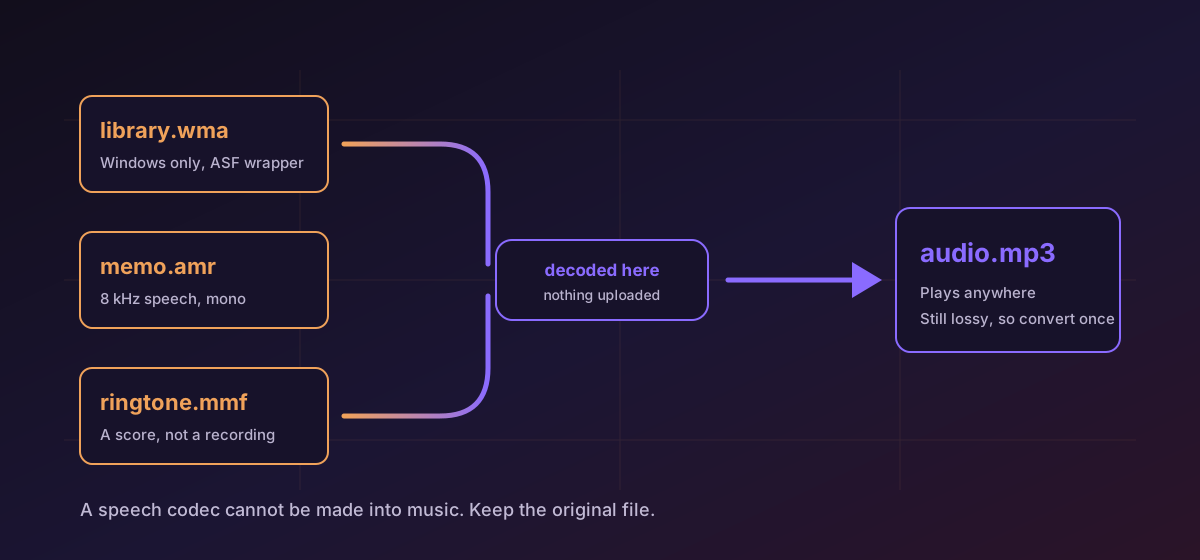
Some audio formats outlive the machines they were made for. A .wma library was ripped on a Windows PC that no longer boots. An .amr voice note came off a handset with a monochrome screen. An .mmf ringtone was performed by a synthesiser chip nobody has manufactured in twenty years. All three still open. What they open into is the interesting part.
WMA is a library format, and only Windows still reads it#
Windows Media Audio arrived in 1999 as Microsoft's answer to MP3, and for about a decade it was what Windows Media Player produced when you ripped a CD. The audio sits inside an ASF container, the same wrapper WMV video uses, and WMA Pro, WMA Lossless and WMA Voice all share the .wma extension, so the name tells you little.
What it does tell you is where it will not play: no browser decodes WMA, macOS does not, Android does not. That is the entire reason to move it. Convert WMA to MP3 and the result opens on anything made this century, or read the WMA format page for the variant detail first.
AMR sounds the way it does on purpose#
AMR is not a music codec that turned out badly. It is a speech codec that succeeded. 3GPP adopted Adaptive Multi-Rate in 1999 as the mandatory codec for GSM voice, and its job was to carry an intelligible human voice through radio interference on a handful of kilobits per second. It does that by modelling the speaker rather than the sound: ACELP fits a source-and-filter model of the vocal tract to each 20-millisecond frame, and what travels down the wire is the parameters of that model.
The design has consequences you can hear immediately. Narrowband AMR samples at 8 kHz, so nothing above roughly 3.4 kHz is present in the file at all: no cymbals, no string harmonics, no sibilance. It is mono, always. The bitrate ladder runs from 4.75 to 12.2 kbps, and the frames sit behind a bare '#!AMR' header with no tags of any kind.
Almost nothing outside Android opens .amr directly, so the conversion is usually worth doing. Convert AMR to MP3 for a file a phone, a browser or a transcription tool will accept, and the AMR format page covers the wideband sibling.
MMF was never a recording at all#
A .mmf file is Yamaha SMAF, the format behind polyphonic ringtones on early-2000s handsets. The thing to understand about it is that it usually holds a score rather than a recording. Score tracks drive FM and wavetable synthesis on a Yamaha MA-series chip, sometimes blended with short ADPCM samples, and what a person actually heard depended on which chip was in their phone: 16 voices on an MA-2, 64 on an MA-5.
So converting MMF to MP3 produces a rendering. It is a performance of the sequence, not a recovery of what one handset played in 2004, and nothing can give you that without the hardware. Keep the .mmf: it is the score, and the MP3 is one reading of it.
What the three of them share#
All three are lossy, so the rule is the same in every case: convert once, from the original, straight to what you actually need, and keep the original. Each extra lossy encode is another generation of loss, and unlike the first one it buys you nothing.
A lossless target buys one thing: a stopping point. If the audio is heading into an editor, decoding it once with WMA to FLAC means the edit and the export are the only further lossy steps rather than the third and fourth. It improves nothing about the audio, and our guide to lossless audio is blunt about why.
- Check the duration first. A truncated file is the most common real failure and takes two seconds to spot.
- Listen to the first and last few seconds. Problems cluster at the boundaries.
- Expect tags to be missing. AMR has none at all, and ASF attributes do not map cleanly onto ID3.
- For anything you care about, run through verifying conversion results rather than trusting the file opened.
Troubleshooting
It is a DRM-protected purchase and the licence server no longer exists. Confirm by trying to play it in Windows Media Player; if playback fails there, no tool can decode it.
That is the source. Narrowband AMR holds nothing above about 3.4 kHz and is mono, so the output is telephone quality by construction. A higher output bitrate cannot add what was never sampled.
SMAF is sequence data performed by a specific Yamaha chip. A conversion renders the score with a different synthesiser, so it is a faithful performance rather than a reproduction. Keep the .mmf.
Expected. AMR has no tag structure at all, and ASF attributes do not map onto ID3 field for field. Re-tag after the move rather than assuming metadata travelled.
Frequently asked questions
Why will nothing play my .wma files any more?
WMA is proprietary and effectively abandoned outside Windows. No browser ships a decoder, and neither macOS nor Android plays it natively. Converting to MP3 or FLAC is the practical fix, and it is a one-time job.
Can I improve an AMR recording by converting it at a higher bitrate?
No. AMR is narrowband, mono, and models speech rather than storing a waveform, so everything above roughly 3.4 kHz is absent from the file. A higher output bitrate produces a larger file containing the same audio.
Is an MMF conversion accurate?
It is an accurate performance of the sequence, not a reproduction of a particular handset. SMAF drove Yamaha MA-series chips whose polyphony and voices varied by phone, so the original sound was partly a property of the hardware.
Should I convert these to FLAC to protect them?
Only if the audio is about to be edited, in which case decoding once to a lossless format avoids a second lossy generation. It does not improve the audio and it makes the file several times larger.
Is any of this uploaded?
No. Conversion runs entirely in your browser. That matters more than usual here, because these formats are dominated by voice recordings of real people.