Shipping SVG: Keep the Vector, or Flatten It to Pixels
An SVG is an XML document, not an image file, and that single difference decides where it belongs. When vector delivery wins, when it becomes a liability, and the security part nobody mentions.
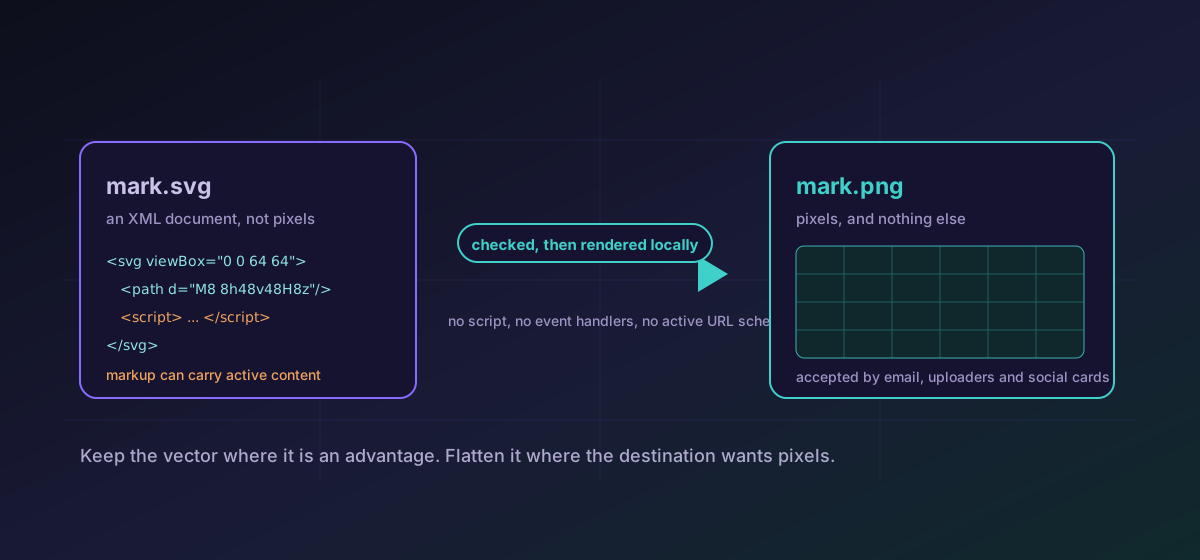
PNG and JPEG are files containing pixels. An SVG is not that. It is an XML document describing shapes, and like any document it can reference other resources, carry stylesheets, and hold script. Treating it as though it were simply another picture format is where both the good decisions and the bad ones come from, so it is worth being precise about what it actually is before deciding where to send it.
Where keeping the vector clearly wins#
For geometric artwork, SVG is not merely smaller, it is a different class of asset. One file renders sharply on a phone at a two-pixel-per-CSS-pixel density and on a 5K monitor, with no second copy and no size negotiation. Text inside it stays real text, so it is selectable, searchable, and available to a screen reader. It can be styled with CSS, which is how icon systems get recoloured by a theme without shipping a second set of files. And because it is text, it compresses extremely well and can be diffed in a pull request like code.
- Logos and brand marks that must stay crisp at every density and every size.
- Icon systems inlined into the page so CSS can recolour them for light and dark themes.
- Charts, diagrams and maps generated by code, where the geometry is the data.
- Line art and illustration with flat fills, which is exactly the content raster formats handle worst.
Where it turns into a liability#
The first limit is content. Photographs have no economical vector representation, which is why tracing one produces a large file that looks worse than the original. The second is complexity: a drawing with thousands of paths and stacked filter effects can render more slowly than an equivalent PNG, because the browser is executing a drawing program rather than blitting a bitmap. The third is the destination. Email clients, older office software, many CMS uploaders and most social platforms will not take an SVG, and some reject it deliberately rather than by omission.
When any of those apply, flattening is the right answer rather than a compromise. SVG to PNG produces a raster at the size the drawing declares, and SVG to PDF keeps the geometry as real vector inside a container that print workflows and document viewers accept without argument.
The part that is usually left out#
Because an SVG is a document, it can contain a script element, an event-handler attribute such as onload, or an href pointing at a javascript: URL. When such a file is served from your own origin and opened directly, or inlined into your HTML, that code runs with your site's privileges. This is not a theoretical concern: it is why platforms that accept image uploads so often refuse SVG outright, and why the ones that do accept it either sanitise the markup or serve it from a separate domain.
The practical rules follow from the mechanism rather than from superstition. Referencing an SVG through an img element is a non-scripted context, so script inside it does not execute; that is the safe way to display artwork you did not author. Inlining the same markup into your page is the opposite: everything in it becomes part of your document. Treat any SVG that arrived from outside your team as untrusted markup, read it (it is text, so you can), and strip what should not be there before it goes anywhere near your HTML.
Choosing, in one line each#
- Geometric artwork on a surface you control, and you authored the file: keep the vector and inline it.
- Geometric artwork you did not author: keep the vector, reference it through an img element, and do not inline it.
- Any destination that rejects SVG uploads, or any email: rasterise to PNG at a size you chose deliberately.
- Photographic content: it was never a vector candidate. Use a raster format from the start.
- Print or a document handoff: export to PDF, where the geometry stays vector and the recipient needs no special tooling.
If you are going the other direction and trying to recover a vector from a bitmap, tracing a PNG or JPG to SVG sets out what that can realistically achieve. For putting vector artwork into a document alongside images, images and SVG to PDF covers the layout side.
Troubleshooting
Many refuse it deliberately as a scriptable document rather than by oversight. Rasterise to PNG at a chosen size instead of looking for a way around the rule.
A drawing with thousands of paths and stacked filters is a program the browser has to execute. Flatten it to a raster for that surface.
Read the file, it is plain text. Reference it through an img element rather than inlining it, and remove anything that should not be there before it touches your HTML.
Photographs have no economical vector form. Keep the raster and choose a suitable image format instead.
Frequently asked questions
Is SVG always the better choice for logos?
For surfaces that accept it, usually yes: one file stays sharp at every density and can be recoloured by CSS. For email, older office software and platforms that reject SVG uploads, a PNG at a deliberately chosen size is the correct answer.
Can an SVG really carry script?
Yes. It is an XML document, and the specification allows script elements, event-handler attributes and active URL schemes. That is why so many upload pipelines sanitise SVG or refuse it entirely.
Is it safe to display an SVG I did not author?
Referencing it through an img element is a non-scripted context, so script inside it does not run. Inlining the same markup into your page is a different matter, because everything in it becomes part of your document.
Does Novus Convert sanitise SVG files?
It verifies every SVG it emits, and checks the SVG you supply on the vector export routes, for a real svg root and no script elements, event handlers or active URL schemes. That is a guard on this conversion rather than a general sanitiser you should rely on for arbitrary files.
Is my artwork uploaded when I convert it?
No. The drawing is parsed and rendered in your browser. For an unannounced logo that distinction is the whole point, because an SVG is readable text and a copy left on a server cannot be recalled.