Rasterising Vector Art Without Guessing at the Size
A vector drawing has no resolution until you give it one, and the number usually comes from the file itself. How to control the output size, transparency and format when flattening artwork.
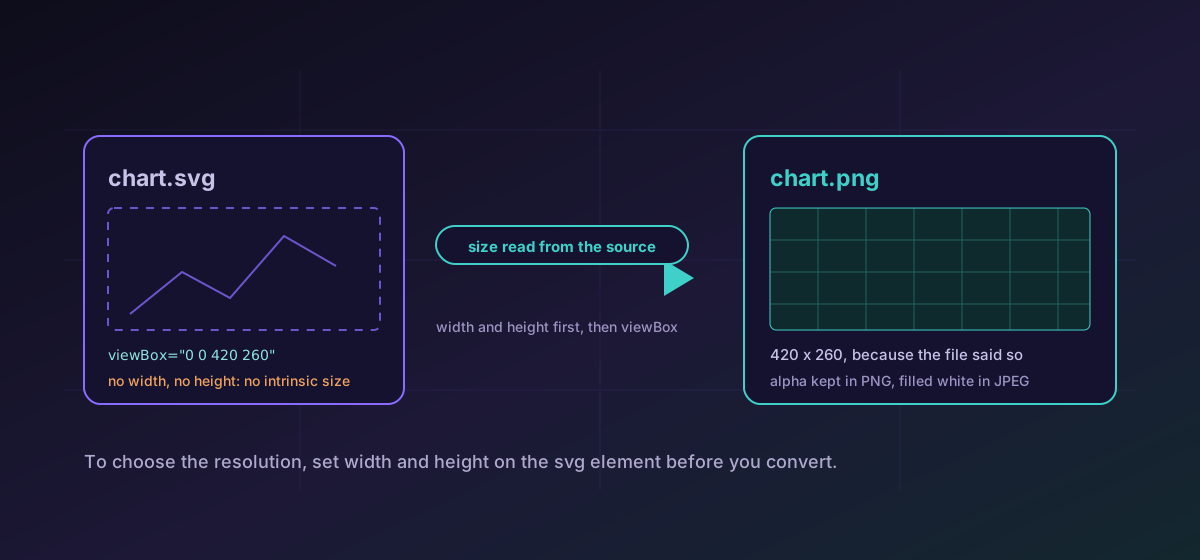
A vector drawing has no size. It has proportions, and a coordinate system, and nothing that says how many pixels it should become. Every rasteriser has to get that number from somewhere, and whether you like the result depends entirely on where it looked. This is the single most common reason an exported PNG comes out blurry or unexpectedly small, and it is fixable in the source file rather than in the converter.
Where the number comes from#
An SVG can declare two different things. A viewBox establishes the coordinate system: four numbers saying what region of drawing space the graphic occupies. Separate width and height attributes, when given in absolute units, declare an intrinsic size in pixels. A file can have both, one, or neither, and the difference matters enormously.
Anything exported by a charting library, by D3, by matplotlib, or by an illustration tool set to a responsive option, typically declares only a viewBox. Such a file has no intrinsic size at all, and a browser asked to lay it out will fall back to the default box for a replaced element, which is 300 by 150 pixels scaled to the aspect ratio. A rasteriser that takes its dimensions from the laid-out image rather than from the markup therefore produces a small picture from a large drawing, quietly, with no error to look at.
The practical consequence is simple and worth repeating: to control the resolution of the export, set explicit width and height on the svg element in the source. It is a two-attribute edit in a text editor, and it is more reliable than any scaling option, because the size is then recorded in the artwork itself and everyone who converts that file afterwards gets the same answer.
Choosing a size on purpose#
- Start from where the image will actually be displayed, measured in CSS pixels, not from a number that sounds generous.
- Multiply by two for high-density screens. Beyond two the extra bytes stop buying visible sharpness for most artwork.
- Round to whole pixels. A fractional target guarantees resampling on edges that were meant to be crisp.
- For icons, export each size from the vector separately rather than scaling one large raster down repeatedly. Every resample softens the result a little more.
- Look at the output at one hundred percent before shipping it. A drawing that was designed at one scale often needs its stroke weights revisited at another.
Transparency, and the format that discards it#
PNG carries a real alpha channel, which is why it is the default destination for a logo or an icon that has to sit on an unknown background. WebP carries alpha too. JPEG does not, and cannot: there is no transparency in the format, so the transparent regions have to become some colour. This converter fills them with white before encoding, which is a reasonable default and an actively wrong one if the artwork is destined for a dark surface. If the result needs to be transparent, convert SVG to PNG rather than reaching for JPEG out of habit.
When flattening is the right call#
Rasterising is not a downgrade when the destination genuinely wants pixels. Email clients will not render vector. Social platforms and open-graph cards want a fixed-size image. Many CMS uploaders reject SVG on principle. A complicated drawing with hundreds of filter effects can also cost more to render on every page view than a bitmap costs to download once, which makes flattening a performance decision rather than a compatibility one.
Icons are the case where both halves matter at once. Keep the vector as the master, generate each raster size from it, and then build the container: PNG to ICO assembles the icon file itself. The reasoning behind which sizes to include, and why a detailed logo fails at sixteen pixels, is set out in making a favicon that looks right at 16 pixels.
For the trade-offs between the raster formats themselves once you have chosen to flatten, image formats compared covers where each one earns its place.
Troubleshooting
The SVG almost certainly declares only a viewBox and no absolute width or height. Add explicit pixel dimensions to the svg element and convert again.
JPEG has no alpha channel, so transparent pixels are filled before encoding. Export to PNG or WebP when transparency has to survive.
Generate each size directly from the vector. Scaling one raster down repeatedly loses a little definition every time.
Raster output is capped at 8192 pixels per edge. Reduce the declared size in the source, or accept the cap, rather than assuming the file was misread.
Frequently asked questions
What size will my SVG rasterise to?
Absolute width and height attributes on the svg element decide it. Failing those, the viewBox supplies the dimensions, and a file with neither falls back to 1024 pixels on its long edge. Output is capped at 8192 pixels per edge.
How do I control the output resolution?
Set explicit width and height in pixels on the svg element in the source file. It is a two-attribute edit and it makes the intended size part of the artwork, so every later export agrees.
Why did my transparent logo get a white background?
You exported to JPEG, which has no alpha channel. Transparent pixels are filled with white before encoding. Use PNG or WebP when the transparency has to survive.
Should I export at two times the display size?
Two is the useful default for high-density screens. Beyond that the extra bytes rarely buy visible sharpness, and for line art they almost never do.
Is the artwork uploaded during rasterisation?
No. The drawing is parsed, drawn to a canvas and encoded in your browser. Nothing is transmitted, which matters for artwork that has not been announced yet.