Convert SRT, VTT, SBV, and LRC Subtitle Files in Your Browser
Convert captions and timed lyrics locally between SRT, VTT, SBV, LRC, TXT, and JSON while keeping cue timing private and under your control.
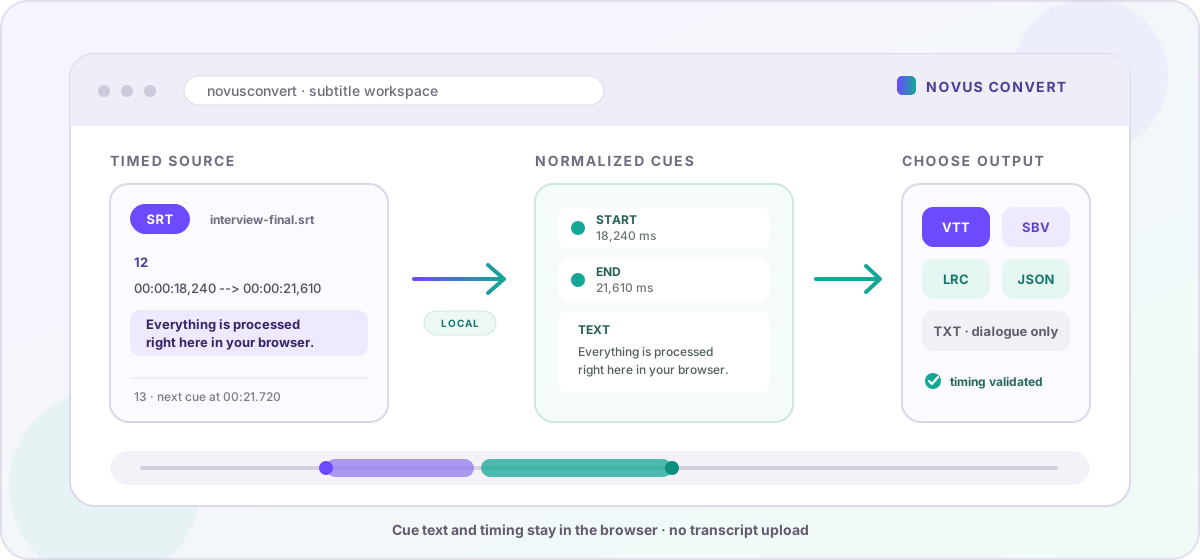
A subtitle file looks like plain text until a platform rejects it. The words may be correct, yet the timestamp punctuation, cue separator, header, or expected extension can still be wrong for a video player, publishing tool, karaoke app, or editing workflow. Novus Convert handles that structural work in the browser: it reads each timed cue, normalizes the timeline, and writes a new SRT, VTT, SBV, LRC, TXT, or JSON file without sending a transcript to a conversion server.
The same dialogue, four different timing conventions#
SRT is the familiar numbered-caption format, with start and end times separated by an arrow and milliseconds written after a comma. WebVTT begins with a WEBVTT header, uses a decimal point in its timestamps, and is designed for web video. YouTube-style SBV places a comma between the start and end values on one timing line. LRC is different: it normally gives each lyric line only a start time, so it behaves more like a synchronized lyric sheet than a conventional caption track.
- Use SRT for a broadly accepted, simple caption exchange file used by editors, players, and upload platforms.
- Use WebVTT for HTML video, browser-native caption tracks, and web publishing workflows.
- Use SBV when a creator or legacy YouTube workflow specifically asks for its start,end timing syntax.
- Use LRC for line-synchronized lyrics where a player advances text from one timestamp to the next.
- Use TXT when you need readable dialogue without timing, or JSON when another tool needs structured startMs, endMs, and text fields.
How Novus Convert rebuilds the cue track#
Open a dedicated route such as SRT to VTT or VTT to SRT. The route preselects the two formats, but the same subtitle engine also powers the general mixed-file queue. It checks the source grammar instead of merely replacing the filename extension, then converts every readable cue into a shared internal timeline before writing the target syntax.
- Add a subtitle file and confirm its input badge. The converter rejects an empty file, malformed timestamps, missing cue text, and source content that does not match the selected format.
- Choose the destination. Caption formats preserve both cue boundaries; LRC preserves start times; TXT removes timing intentionally; JSON exposes the normalized timeline for automation or inspection.
- Start the conversion. Parsing and serialization run locally against the file already held by your browser, with a 5 MB input ceiling that is generous for text but prevents accidental oversized jobs.
- Download the newly generated file. The output uses the correct header, separators, timestamp precision, cue numbering, MIME type, and extension for the selected destination.
- Preview the result in the actual player or publishing platform. Structural conversion solves format compatibility, but the destination still determines line wrapping, font styling, safe areas, and reading speed.
What carries across, and what needs a review#
Between SRT, VTT, and SBV, the converter keeps cue start time, end time, and multiline text. It deliberately writes clean, normalized cues rather than copying every source-specific decoration. WebVTT NOTE, STYLE, and REGION blocks are not reproduced, and positioning or cue-setting data outside the basic timestamp is not a portable promise. If a track relies on branded styling, speaker placement, or region definitions, keep the original and reapply those instructions in the destination format after conversion.
LRC has no explicit end time for an ordinary line. When LRC becomes a caption format, Novus Convert ends each cue at the next lyric timestamp; the final line receives a four-second duration. Going the other way keeps each caption's start time but drops its end time, and multiline captions are flattened into a single lyric line. That is a sensible, deterministic bridge between two timing models, but it cannot invent editorial decisions that the LRC source never contained.
A practical caption handoff checklist#
Check the first cue, the last cue, a multiline cue, punctuation, non-English characters, and at least one fast exchange after conversion. Confirm that the finished video and subtitle track use the same time origin and duration; changing SRT to VTT does not repair a transcript that was already offset from the picture. For accessibility, look beyond technical validity: keep lines concise, allow enough reading time, identify speakers when the visual does not, and include meaningful sounds rather than dialogue alone.
For a YouTube-oriented source, start with SBV to SRT; for synchronized lyrics moving onto web video, try LRC to VTT. If several caption files are part of a larger delivery, the mixed batch workflow can keep them beside the related documents and media while each row uses its own supported output. The reliable workflow is simple: convert the structure locally, then review the words and timing where people will actually watch them.
Troubleshooting
No. Novus Convert parses each cue into millisecond start and end values, then writes those same boundaries in WebVTT syntax. The visible punctuation changes from a comma to a decimal point and a WEBVTT header is added, but the timeline does not shift. Any offset already present in the source will remain and should be corrected in a subtitle editor.
Not by this converter. It carries the timed cue text and boundaries, while WebVTT NOTE, STYLE, REGION, positioning, and other format-specific instructions are not copied into the normalized output. SRT does not have direct equivalents for all of them anyway. Keep the original VTT as a reference and reapply necessary presentation rules in the destination workflow.
A normal LRC line supplies only its start. The converter uses the next lyric line's timestamp as the current cue's end, and gives the final line a four-second duration. This keeps the sequence usable as SRT, VTT, or SBV without pretending that precise end times existed in the source.
Frequently asked questions
Does converting SRT to VTT change the subtitle timing?
No. Novus Convert parses each cue into millisecond start and end values, then writes those same boundaries in WebVTT syntax. The visible punctuation changes from a comma to a decimal point and a WEBVTT header is added, but the timeline does not shift. Any offset already present in the source will remain and should be corrected in a subtitle editor.
Can WebVTT styles and regions be preserved in SRT?
Not by this converter. It carries the timed cue text and boundaries, while WebVTT NOTE, STYLE, REGION, positioning, and other format-specific instructions are not copied into the normalized output. SRT does not have direct equivalents for all of them anyway. Keep the original VTT as a reference and reapply necessary presentation rules in the destination workflow.
How are LRC end times created when converting to captions?
A normal LRC line supplies only its start. The converter uses the next lyric line's timestamp as the current cue's end, and gives the final line a four-second duration. This keeps the sequence usable as SRT, VTT, or SBV without pretending that precise end times existed in the source.
What is included in a subtitle JSON export?
The JSON file contains a cues array. Every cue has startMs, endMs, and text values, making the timing explicit and easy for code to consume. It is useful for indexing, analysis, or a custom publishing pipeline, but it is not itself a caption format that a standard video player will automatically display.
Are subtitle files uploaded for conversion?
No. Parsing and output generation happen inside the browser using the file on your device. The app does not send the transcript to a conversion API or save it to an account. The generated result is held behind a temporary local URL until you download it, clear the job, or close the page.