Convert TTF, OTF, WOFF, WOFF2, and EOT Fonts in Your Browser
Convert desktop and web font containers locally, choose the right TTF, WOFF, WOFF2, or EOT output, and validate the result before using it.
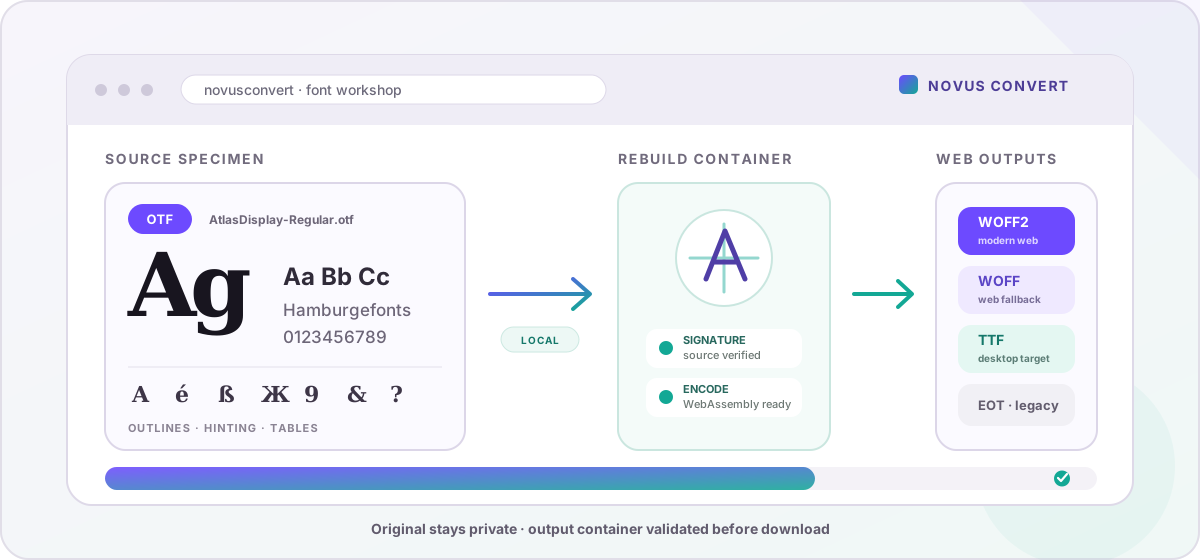
A font extension describes more than a download label. It tells a browser or design application how outlines, tables, compression, and compatibility data are packaged. That is why renaming a .ttf file to .woff2 does nothing useful, and why a website may reject a perfectly good desktop font. Novus Convert opens the real font container, rebuilds it in a supported destination, checks the new signature, and keeps the source on your device throughout the process.
What TTF, OTF, WOFF, WOFF2, and EOT are for#
TTF is the familiar TrueType desktop container and remains a useful interchange format. OTF is an OpenType container that may use TrueType or CFF/PostScript outlines and can carry sophisticated layout tables. WOFF wraps font data for web delivery, while WOFF2 applies more efficient Brotli-based compression and is the normal first choice for modern sites. EOT is a legacy Microsoft web-font format retained mainly for old Internet Explorer-era requirements.
- Choose TTF when a desktop app, operating system, or downstream font tool asks for a TrueType file.
- Choose WOFF2 for the smallest modern web-font delivery among the outputs Novus Convert supports.
- Choose WOFF as a broader legacy web fallback when your browser support policy still requires it.
- Choose EOT only for a specifically documented older Microsoft target; it is rarely useful in a new project.
- Keep the original OTF whenever its advanced tables or PostScript outline behavior is important, because conversion is a compatibility step rather than a perfect archival copy.
The private font conversion path#
For a typical website handoff, open TTF to WOFF2. If the foundry supplied OpenType instead, OTF to WOFF2 accepts that container as the source. The converter verifies the input signature, reads the font through the browser-side font engine, writes the selected destination, and verifies that the result begins with the expected TTF, WOFF, WOFF2, or EOT structure before enabling a download.
- Add the font and confirm the detected input. A mismatched extension or empty file is rejected instead of being passed through with a new name.
- Choose TTF, WOFF, WOFF2, or EOT from the supported outputs. OTF can be read, but this release does not write a new OTF file, so that destination is intentionally unavailable.
- Start the conversion. WOFF2 encoding and decoding uses the bundled WebAssembly module; the remaining font parsing and writing also happens in the local browser session.
- Download only after output signature validation. The check confirms that the promised container was created, though visual proof still requires testing the glyphs you actually use.
- Load the result in a specimen page or target application and inspect punctuation, accented characters, weights, ligatures, kerning pairs, and any scripts beyond basic Latin.
What conversion preserves - and what it cannot promise#
The engine is configured to keep TrueType hinting, compound glyph structure, and kerning data when the destination supports the writing path. WOFF2 is a special case in this build: kerning-table writing is disabled because the bundled encoder otherwise returns an empty result. Modern shaping may still draw spacing information from other tables, but you should not assume every pair will behave identically. A valid container signature proves that the file is structurally the requested format, not that every advanced typography feature survived unchanged.
OTF is also a broad label. Some OTF sources use CFF/PostScript outlines or include variable axes, color glyphs, alternate sets, language systems, and foundry-specific tables. Rebuilding one as a TrueType-compatible web font can change or omit features the target container or current engine does not reproduce. Novus Convert does not subset the character set, generate a CSS family, or promise lossless round-tripping for variable and color fonts. Keep the licensed original, then compare the converted specimen before shipping it.
Build a dependable web-font handoff#
For a current website, WOFF2 is usually the primary source and WOFF can be a policy-driven fallback. Declare the correct weight and style in each @font-face rule, use font-display deliberately, and make the family name consistent across the CSS and font metadata. Conversion alone does not make a page fast: if the source contains thousands of unused glyphs, a separate licensed subsetting workflow may still be needed. Preload only fonts needed above the fold, because preloading every weight can compete with the page's more important resources.
If you receive an existing web font and need a desktop-compatible inspection copy, use WOFF2 to TTF. For a deliberately old compatibility package, WOFF to EOT is available as well. Multiple font files can sit beside images and documents in the private batch converter, with each weight receiving its own destination. Name outputs clearly, retain the originals, confirm the license, and test the characters and browsers that matter before deployment.
Troubleshooting
WOFF2 is normally the primary choice because it offers better compression and is supported by modern browsers. WOFF may still be useful as a fallback when a documented browser-support policy requires it. A new site rarely needs EOT. Whatever you choose, test the actual family, weights, styles, and character ranges rather than judging only by the extension.
No. OTF is accepted as an input, but the current font engine writes TTF, WOFF, WOFF2, and EOT outputs. The app leaves OTF unavailable as a destination instead of claiming a conversion it cannot validate. Keep the original OTF as the authoritative source, especially when it contains advanced OpenType or PostScript-specific data.
That is not guaranteed. The current WOFF2 writer disables its kerning-table flag because enabling it causes the bundled encoder to return an empty output. Advanced layout tables, variable axes, color glyphs, and OTF-specific features can also vary by source. Inspect representative kerning pairs, languages, ligatures, and alternate glyphs in the target browser before publishing.
Frequently asked questions
Should I use WOFF or WOFF2 on a modern website?
WOFF2 is normally the primary choice because it offers better compression and is supported by modern browsers. WOFF may still be useful as a fallback when a documented browser-support policy requires it. A new site rarely needs EOT. Whatever you choose, test the actual family, weights, styles, and character ranges rather than judging only by the extension.
Can Novus Convert create an OTF file?
No. OTF is accepted as an input, but the current font engine writes TTF, WOFF, WOFF2, and EOT outputs. The app leaves OTF unavailable as a destination instead of claiming a conversion it cannot validate. Keep the original OTF as the authoritative source, especially when it contains advanced OpenType or PostScript-specific data.
Will all kerning and OpenType features survive WOFF2 conversion?
That is not guaranteed. The current WOFF2 writer disables its kerning-table flag because enabling it causes the bundled encoder to return an empty output. Advanced layout tables, variable axes, color glyphs, and OTF-specific features can also vary by source. Inspect representative kerning pairs, languages, ligatures, and alternate glyphs in the target browser before publishing.
Does converting a font make it legal to use on the web?
No. File conversion does not alter ownership or licensing terms. A desktop license may not include web embedding, redistribution, modification, or conversion rights. Read the typeface's license and obtain the appropriate web or app license before deploying the result. Keep proof of licensing with the project rather than relying on the converted filename.
Are font files uploaded during conversion?
No. The source is parsed and re-encoded in the browser, including local WebAssembly for WOFF2 work. There is no font-processing upload or remote asset account. Results use temporary local URLs and disappear from the session when you clear the job or close the page, though the file you explicitly download remains on your device.