A Web Font Is a Desktop Font in a Delivery Wrapper
WOFF2 is not a different typeface, it is the same sfnt tables preprocessed and squeezed with Brotli. What that means for the file you ship, and what the wrapper cannot fix.
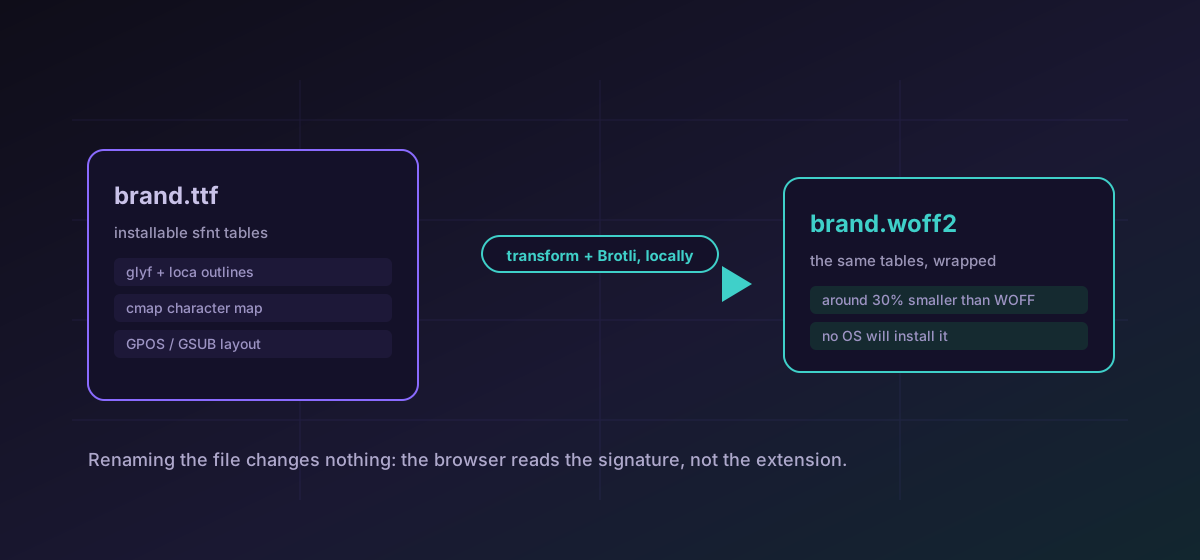
There is a persistent idea that a web font is a special kind of typeface, drawn differently or cut down for screens. It is not. A WOFF2 file contains the same sfnt tables as the TrueType or OpenType font it was made from: the same glyph outlines, the same character map, the same layout features. What changed is the packaging. That one fact settles most of the questions people have about which file to ship, and it explains why so many font problems turn out to be CSS problems in disguise.
What the wrapper actually does#
WOFF2 applies two things to a font. First it transforms the outline tables, re-encoding the glyf and loca data into a shape that compresses better. Then it runs Brotli over the whole file. The result averages around thirty percent smaller than the zlib-based WOFF that preceded it, with larger savings on fonts carrying big CJK character sets. Decompressing a WOFF2 reconstructs a working font, which is exactly why it is described as a transport format rather than a font format. Nothing about the typeface is lost or simplified on the way in.
- TTF and OTF are the installable containers. An operating system accepts them, a font editor opens them, and TrueType remains the most portable file you can hand to someone with no context.
- WOFF2 is what a modern site serves. No operating system will install it, and that is part of the design: the wrapper discourages casual desktop installation of a licensed web font.
- WOFF is the older web wrapper. Ship it only when a written browser-support policy asks for it, because it is otherwise weight with no audience.
- EOT belongs to the Internet Explorer era and has no place in a new project.
Renaming does nothing, and the browser says so#
A .ttf renamed to .woff2 is still a TrueType file. The browser reads the first four bytes, finds the TrueType version tag where it expected the ASCII marker wOF2, and refuses the font outright. There is no quiet fallback that makes it work anyway. The fix is a real repackaging: convert TTF to WOFF2, which opens the font, reads its tables, writes a genuine WOFF2 container, and checks the output signature before offering a download.
What a browser needs beyond the file itself#
A correctly packaged font still renders badly if the CSS around it is wrong, and that is where most real font bugs live. Four things matter more than the container choice.
- One @font-face rule per weight and style, each declaring the font-weight and font-style it actually contains. Point three weights at one file and the browser synthesises the other two, producing the smeared fake bold that gives web type a bad name.
- A consistent family name across every rule. The name in the CSS need not match the name inside the font, but it must match itself, and a stray capital or a trailing space breaks the match without any warning.
- A deliberate font-display value. The default behaviour hides text while the font is arriving, which is a content problem rather than a typographic one.
- Preload only what is above the fold. Preloading every weight sets the fonts competing with the resources the page needs first, and a font that arrives before the text it styles has gained you nothing.
Going back the other way#
You will sometimes receive a web font and need a desktop copy to inspect it, check its metrics, or open it in an editor. WOFF to TTF unwraps the older container, and OTF to TTF covers the case where a foundry supplied OpenType and a downstream tool insists on TrueType. If all you inherited is a legacy package from an old site, EOT to WOFF2 brings it forward. None of this changes what you are permitted to do with the font, which is a separate question and one worth settling before you start.
The thing conversion will not do#
Conversion is repackaging, not slimming. If your source carries nine thousand glyphs covering scripts your site will never set, the WOFF2 is smaller than the TTF and still far larger than it needs to be. Cutting the character set down is subsetting, a separate operation with its own licensing implications, and no container change substitutes for it. The honest order of work is: confirm what the licence permits, subset if it permits that and the font is heavy, then package for delivery and test.
For the full route map across all five font containers, including which destinations this site writes and which it only reads, see converting TTF, OTF, WOFF, WOFF2 and EOT. It is the companion piece to this one and covers the mechanics rather than the reasoning.
Troubleshooting
Check the first bytes of the file rather than the extension. A renamed TTF fails the WOFF2 signature check and no fallback rescues it.
The browser is synthesising a weight. Declare a separate @font-face rule for each real weight instead of pointing several rules at one file.
That is the default font-display behaviour hiding text while the font arrives. Choose a value deliberately rather than leaving it to the default.
Conversion repackages, it does not subset. A font carrying scripts you never set stays heavy in every container.
Frequently asked questions
Is a WOFF2 a different typeface from the TTF it came from?
No. It carries the same sfnt tables, transformed and compressed with Brotli for transport. Unpacking one reconstructs a working TrueType or OpenType font, which is why it is called a delivery wrapper rather than a font format.
Can I install a WOFF2 on my computer?
No operating system accepts it for installation. Convert it to TTF first if you need a desktop copy, and check that your licence covers desktop use before you do.
Do I still need to ship WOFF alongside WOFF2?
Only if a written browser-support policy requires it. WOFF2 support is effectively universal among browsers still receiving updates, so a second file is usually bytes with no audience.
Why might my converted font lose kerning?
The WOFF2 writer in this build runs with its kerning-table flag disabled, because enabling it makes the bundled encoder return an empty result. Modern shaping often draws spacing from other tables, but test representative pairs rather than assuming.
Is the font file uploaded during conversion?
No. Parsing and re-encoding happen in your browser, including the WebAssembly work for WOFF2. Nothing is sent to a server, and the result stays a temporary local object URL until you download it.