JSON Lines and NDJSON: One Record Per Line, and Why Logs Use It
A file of JSON objects with no enclosing array is not broken JSON. It is a streaming format with a specific reason to exist, two names for the same thing, and a useful comparison with CSV.
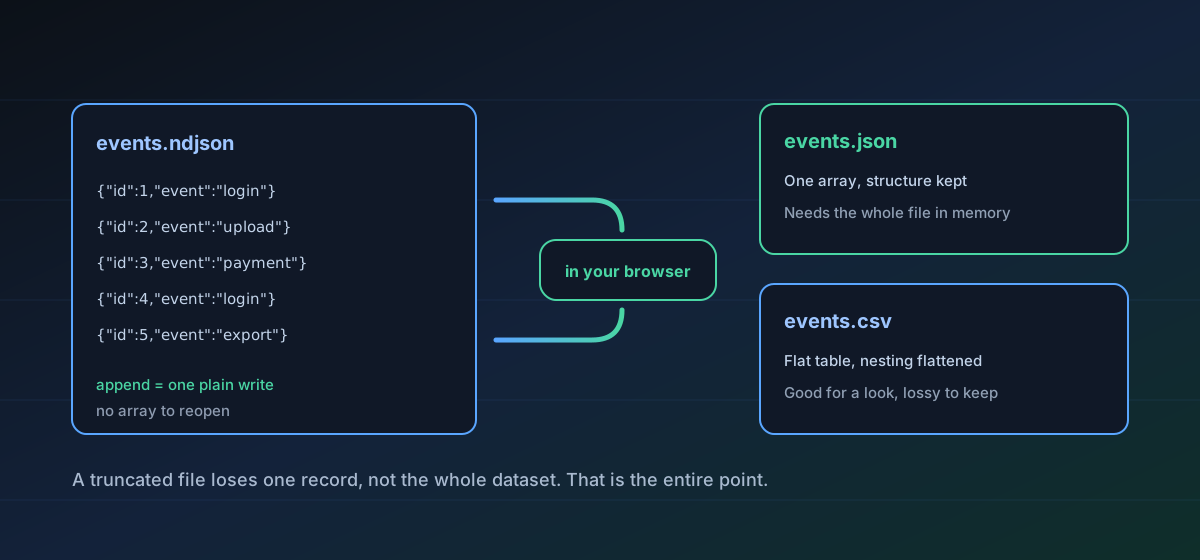
Open a .jsonl or .ndjson file in a JSON validator and it will tell you the file is invalid. It is not. The file holds one complete JSON value per line with no enclosing array and no commas between records, and that is deliberate. Almost every large dataset and log stream you are likely to be handed is shaped this way, for one reason that is worth understanding before you convert anything.
The reason is appending#
A JSON array cannot be appended to. Adding a record means rewriting the final byte, which means seeking to the end, overwriting the closing bracket, writing the new record and closing the array again. Do that from several writers at once and the file is corrupt. Drop the array, and appending a record is a plain write with no seek, no lock and no read of anything already there.
Every other property follows from that. A truncated file loses its last record rather than the whole document, because every earlier line is still complete and independent. A reader can process one record at a time and discard it, so a dataset larger than memory is no harder than a small one. Splitting work across machines is a matter of cutting on line boundaries, which requires no parsing at all.
Two names, one format#
JSON Lines and Newline Delimited JSON are the same layout described twice, around 2013, by different people. NDJSON got a written specification and the registered media type application/x-ndjson; JSON Lines stayed a documented convention. Neither won, so tools pick an extension by whichever ecosystem they came from and everybody else guesses. A reader that handles one handles the other, which is why JSON Lines to JSON and NDJSON to JSON behave identically here. The JSON Lines format page and the NDJSON page record the small differences that do exist, which amount to the media type and the strictness of the wording about embedded newlines.
The CSV comparison#
CSV solves the same appending problem and has done since long before JSON existed: one record per line, append by writing a line. The difference is what a record may contain. CSV rows are flat and the column set is fixed by a header, so every row has to agree about its shape. A JSON Lines record carries its own field names and can nest, so records in one file may legitimately differ from each other.
- CSV is smaller, because field names are written once in the header rather than on every row.
- JSON Lines is self-describing per record, which is what makes it usable for heterogeneous events where a login and a payment share a file.
- CSV has no types at all. JSON Lines has JSON's types, which is not many, but is more than none.
- Neither has a schema. In CSV the header at least pins the columns; in JSON Lines nothing constrains record five from looking nothing like record four.
That last point is the practical hazard. A file can parse perfectly and still be heterogeneous enough to break whatever you feed it into. Converting to a table is a fast way to see it: NDJSON to CSV or JSON Lines to CSV will show you the union of the fields and where the gaps are.
When to convert to a single JSON document#
Collecting the lines into one array is the right move when a tool insists on a single JSON document, when you want to read the whole thing in an editor with folding, or when you are handing the data to something that parses once and holds everything. It is the wrong move when the file is genuinely large, because the resulting array has to be parsed and held in one piece, which is exactly the constraint the format was designed to avoid.
A browser has a memory ceiling that a production log file will find. If the file is bigger than a few hundred megabytes, convert a sample to understand the shape and do the real processing with a tool that streams.
Things that go wrong#
- Pretty-printed records. A JSON object spread across several lines is not JSON Lines, and no reader will accept it. If a tool pretty-printed the output, the file needs re-exporting rather than repairing.
- A trailing blank line. Harmless, and parsers are expected to skip blank lines, but a strict reader written in an afternoon may not.
- A truncated final record, usually from a process that was killed. Everything before it is intact, which is the format working as intended.
- Mixed record shapes that only surface downstream. Convert to a table early and look at the columns before you commit to a pipeline.
Checking the output rather than assuming it applies here as much as anywhere else. The guide to verifying a conversion covers what to actually look at, and the CSV, JSON and Excel guide covers what a spreadsheet will do to the result once it opens it.
Troubleshooting
Expected. The file is not a single JSON document by design. Validate one line, not the whole file, or convert it to JSON first.
Usually a pretty-printed or truncated record. Find the line number in the error, look at that line, and re-export rather than hand-patching a large file.
The records disagree about their fields, and the table is the union of all of them. That is real information about the dataset, not a conversion fault.
Collecting a large stream into one array needs the whole thing in memory at once. Convert a sample to learn the shape, then process the full file with a streaming tool.
Frequently asked questions
Is .jsonl different from .ndjson?
Not in practice. Same layout, two names, written up separately around 2013. NDJSON has a specification and the media type application/x-ndjson; JSON Lines is a convention. Any reader that handles one handles the other.
Why not just use a JSON array?
Because an array cannot be appended to without rewriting its final byte, and a truncated array is unreadable in full. Dropping the array makes appending a plain write and limits the damage from truncation to one record.
Should I convert to CSV or to JSON?
CSV to look at the data, JSON to keep working with it. CSV flattens nesting and turns differing record shapes into a wide table of blanks, which is useful for inspection and lossy for anything else.
Can very large log files be converted in a browser?
Up to a point. Collecting everything into one document needs it all in memory, and production logs regularly exceed what a browser tab will hold. Convert a sample first; that is usually enough to answer the question you had.
Are my logs uploaded?
No. The conversion runs locally in your browser. Nothing is transmitted, which for files full of user activity is the reason to do it this way rather than a side benefit.