One Sheet or Every Sheet: Worksheet Picker and Manifest Zips
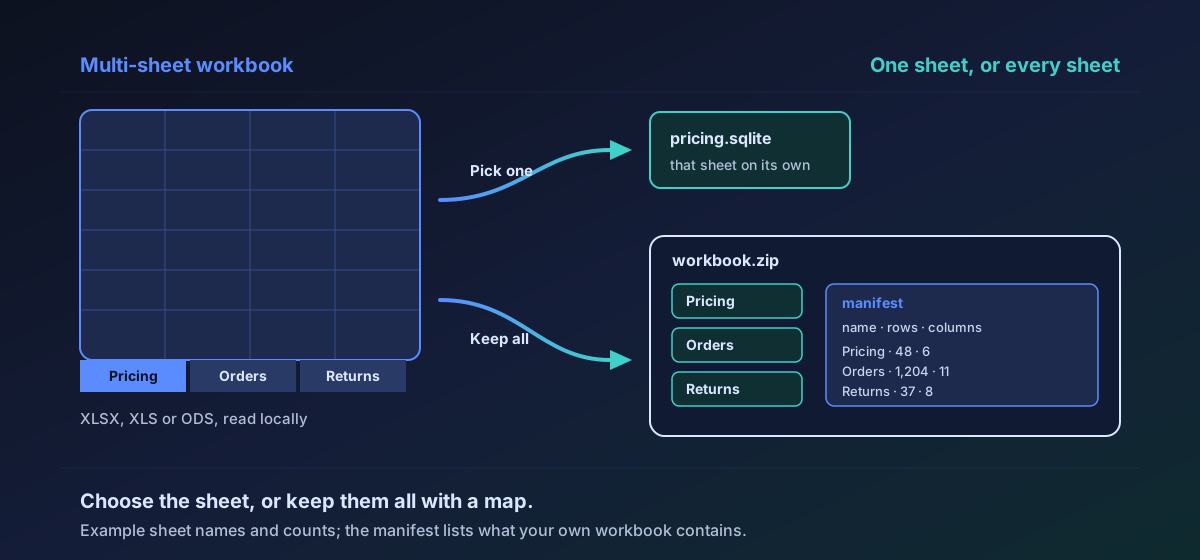
A multi-sheet workbook can convert one chosen worksheet, or every sheet packaged as a ZIP with a manifest of names, row counts, and columns. Both paths run entirely in your browser.
Worksheet picker walkthrough
Choose one worksheet or export every sheet with a manifest ZIP.
Transcript
- Open a multi-sheet workbook locally.
- Pick one worksheet or keep every sheet.
- All sheets ship in a ZIP with a manifest.
- Nothing leaves the browser during conversion.
Workbooks are rarely one table. They are stacks of sheets with different shapes, and converting the whole file as if it were a single rectangle either drops sheets or invents a messy union. Novus Convert's worksheet picker answers the question people actually ask: do I want this sheet, or every sheet, packaged honestly?
Leave the picker alone and every sheet is converted and packaged as a ZIP. Inside that archive a manifest lists each table's name, row count, and columns. Pick one sheet and you get that sheet's file on its own. Both paths stay in the browser; neither uploads the workbook.
Why a manifest exists#
A ZIP of anonymous files forces you to open each member to learn what it is. The manifest is the map: sheet name, how many rows survived, which columns were present. It is not a second copy of the data. It is the index you need when the workbook had seven sheets and you only expected three.
- Default: convert every sheet into the ZIP package.
- Optional: pick one worksheet and download only that table.
- Manifest: name, row count, and columns for each member.
- Narrow screens: worksheet settings follow the complete action row so they cannot cover Download.
Feature walkthrough
Open a multi-sheet workbook
- Open a multi-sheet workbook
- Pick one sheet or keep every sheet
- Download a single file or a ZIP with a manifest
What still stays true about privacy#
Worksheet choice is a conversion-time control on the queued file, not a saved account preference. The workbook is read by the local converter in your browser, and the XLSX format notes describe what the reader accepts. Only true worksheets are read; chart sheets, dialog sheets, and Excel 4.0 macro sheets are ignored rather than mined for text.
When to pick one sheet#
Pick one sheet when the destination is a single SQLite table, a single JSON Lines stream, or a colleague who only asked for the pricing tab. Packaging everything would force them to unpack and guess. Pick every sheet when you are archiving a workbook's tables for later, or when each sheet is a legitimate table you intend to keep.
Before you merge the members of a ZIP downstream, read the manifest's column lists side by side. Do not assume similar sheet titles mean identical schemas; the manifest is there so you can see the difference without opening every file.
Mobile layout was part of the feature#
On a narrow screen, worksheet settings once sat on top of the Download button for a queued workbook. The file converted and could not be collected. The fix was not a special-case for one page: settings now follow the complete action row instead of sharing it. A feature that cannot be collected is not shipped.
How this fits the table wave#
The worksheet picker is the UX half of the same September table expansion that added sixty-eight verified table routes. Routes prove the pair works. The picker proves a multi-sheet workbook can be steered without pretending it was always one table.
Try it with a three-sheet workbook you already understand. Convert all sheets once and read the manifest. Convert a single sheet once and confirm the download is only that table. Those two checks are enough to trust the control before you point it at a larger file.
Troubleshooting
No. The original file stays on your device untouched. The picker only changes what the conversion output contains.
Each packaged table's name, row count, and columns. It is an index for the ZIP members, not a second full copy of every cell.
All worksheets are packaged as a ZIP only when there is more than one. A workbook with a single worksheet, or a conversion where you picked one sheet, downloads as a single table file. The worksheet control appears for XLSX, XLS, and ODS workbooks queued for a table record format.
Frequently asked questions
Does picking one sheet delete the others from my workbook?
No. The original file stays on your device untouched. The picker only changes what the conversion output contains.
What is in the manifest?
Each packaged table's name, row count, and columns. It is an index for the ZIP members, not a second full copy of every cell.
Why did I get one file instead of a ZIP?
All worksheets are packaged as a ZIP only when there is more than one. A workbook with a single worksheet, or a conversion where you picked one sheet, downloads as a single table file. The worksheet control appears for XLSX, XLS, and ODS workbooks queued for a table record format.